Showing posts with label for. Show all posts
Showing posts with label for. Show all posts
Wednesday, March 19, 2014
Chinese New Year Interactive E Book for Smartboard
My students this year are absolutely LOVING non-fiction texts! It took them a while to become interested in them, but every since I started making these interactive e-books, they cant get enough! They have to play close attention to the text in order to be able to answer the questions, and they love to hear the sound effects when they get the question correct!
With the Chinese New Year (a.k.a. the Lunar New Year or Spring Festival) coming up this Friday, January 31, I figured Id give them a look and the history and traditions of the holiday. I learned so much while I was researching to write this book and I cant wait to share it with my students this week!

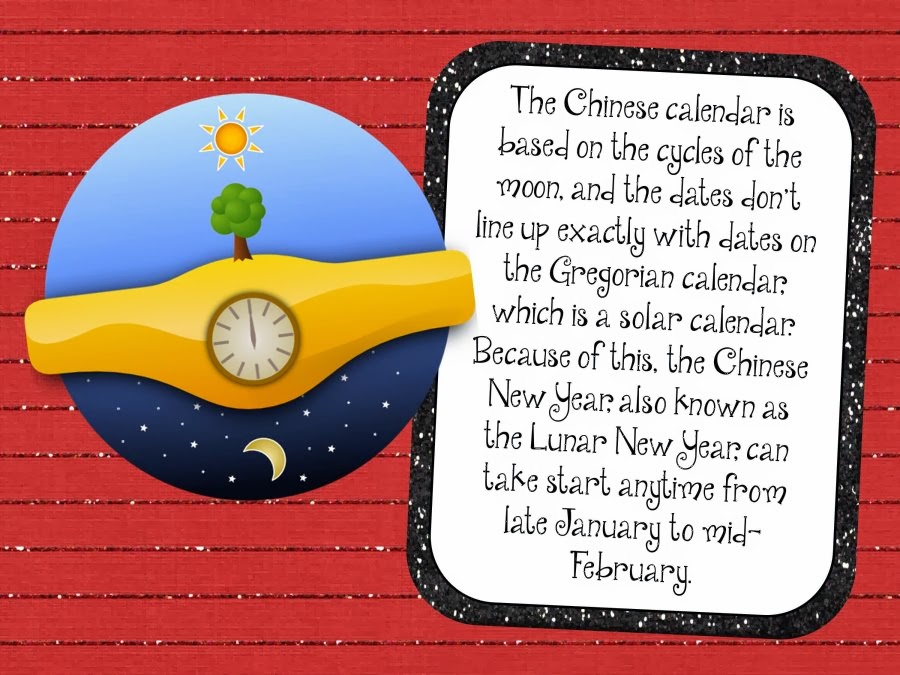


This Smart Notebook file is sure to get your students interested in the Lunar New Year! I hope this helps to inspire all of the students to learn more about other cultures!
Read more...
With the Chinese New Year (a.k.a. the Lunar New Year or Spring Festival) coming up this Friday, January 31, I figured Id give them a look and the history and traditions of the holiday. I learned so much while I was researching to write this book and I cant wait to share it with my students this week!
This Smart Notebook file is sure to get your students interested in the Lunar New Year! I hope this helps to inspire all of the students to learn more about other cultures!

Thursday, March 13, 2014
Do You Want Cheap Books For Your Classroom
There are so many things I love when it comes to my classroom... without card stock, Velcro, clothespins, magnetic tape and magnetic printer paper, I wouldnt know what to do! Ill definitely detail the infinite uses of all of those things one day, but all of those things being said, there is one thing that I am addicted to more than anything else: childrens books!!!
Take a look at how full my bookshelf is in my classroom!

And thats not even all: I have 11 totes full of books in my basement! They are 64 qt. totes and hold 100-200 books!

Obviously, the cost of books can add up quick, especially when we have so many different topics that there are great read alouds for. But, there is a way to get books for your classroom for dirt cheap... library books sales!!! These are probably the best way to build a classroom library!
The best way Ive found library books sales is through this website:

Note: Im not getting paid to promote the website, Im posting it because it honestly is the best!!
Browse through the site to find sales near you. Usually the ones that state "Big Sale!" are pretty good, but only trial and error will really work. You can sign up for a weekly email alerts so youre always aware of the sales in your area (without having to remember to check the website!)
Now, any given day at a library sale is a steal for books... but do you want books for your classroom that are basically free? Of course you do!!!! So you need to go to the book sales on the best day... bag day! Most large library sales have this the last day of their sale. Fill up a whole bag full of books for $5! A lot of places let you even bring your own bag... I get a kick out of people with giant beach bags full of books (ok, so Im usually one of those people but it is funny to watch)!
Not only do I use bag day to stock up on new books for the classroom, but I also use it to fill my treasure chest! The kids just look to bring home books as a prize for their good behavior! I started off this year with two totes full of books for the treasure chest (easily 300 books that I paid a total of $10 for) and all of these books were gone by December! They were the most popular prize as well as the least expensive!
Read more...
Take a look at how full my bookshelf is in my classroom!
And thats not even all: I have 11 totes full of books in my basement! They are 64 qt. totes and hold 100-200 books!
Obviously, the cost of books can add up quick, especially when we have so many different topics that there are great read alouds for. But, there is a way to get books for your classroom for dirt cheap... library books sales!!! These are probably the best way to build a classroom library!
The best way Ive found library books sales is through this website:
Note: Im not getting paid to promote the website, Im posting it because it honestly is the best!!
Browse through the site to find sales near you. Usually the ones that state "Big Sale!" are pretty good, but only trial and error will really work. You can sign up for a weekly email alerts so youre always aware of the sales in your area (without having to remember to check the website!)
Now, any given day at a library sale is a steal for books... but do you want books for your classroom that are basically free? Of course you do!!!! So you need to go to the book sales on the best day... bag day! Most large library sales have this the last day of their sale. Fill up a whole bag full of books for $5! A lot of places let you even bring your own bag... I get a kick out of people with giant beach bags full of books (ok, so Im usually one of those people but it is funny to watch)!
Not only do I use bag day to stock up on new books for the classroom, but I also use it to fill my treasure chest! The kids just look to bring home books as a prize for their good behavior! I started off this year with two totes full of books for the treasure chest (easily 300 books that I paid a total of $10 for) and all of these books were gone by December! They were the most popular prize as well as the least expensive!
Saturday, March 1, 2014
Super Cute White Frames for Your TPT Products! Flash Giveaway!
I have to say I think I have more fun making frames and playing around with shapes than anything else! It definitely incorporates my love of math with my love of technology!
I finally decided to put together all of my white bracket/bubbly frames and make a set out of them! Check them out below! There are 38 different frames, each with and without a border for 76 total frames!!! Theyre normally $8 but the first person to guess which state Im going to be traveling to this summer will win them for free!
If youre not the winner, you can still grab the set while its on sale for tonight only for $6 instead of $8!

Happy guessing and be sure to leave your email address!
Update 9:15pm:
Congratulations to Liann at A Grade One Nut and Her Squirrelly Crew ! Im heading to Alaska this summer on a cruise with the hubby for our anniversary: 10 years since we started dating and two years since we got married!

Thanks to everyone else for all of your guesses! As for everyone who asked about making a tutorial: I have considered it but I made the frames in Adobe Illustrator which is a pretty expensive program. Ive been trying to keep my tutorials to free programs and programs that a lot of people have. I may write it up one day, but unfortunately it wont be in the near future. Sorry! :(
Read more...
I finally decided to put together all of my white bracket/bubbly frames and make a set out of them! Check them out below! There are 38 different frames, each with and without a border for 76 total frames!!! Theyre normally $8 but the first person to guess which state Im going to be traveling to this summer will win them for free!
If youre not the winner, you can still grab the set while its on sale for tonight only for $6 instead of $8!
Happy guessing and be sure to leave your email address!
Update 9:15pm:
Congratulations to Liann at A Grade One Nut and Her Squirrelly Crew ! Im heading to Alaska this summer on a cruise with the hubby for our anniversary: 10 years since we started dating and two years since we got married!
Thanks to everyone else for all of your guesses! As for everyone who asked about making a tutorial: I have considered it but I made the frames in Adobe Illustrator which is a pretty expensive program. Ive been trying to keep my tutorials to free programs and programs that a lot of people have. I may write it up one day, but unfortunately it wont be in the near future. Sorry! :(
Thursday, October 10, 2013
AT T Releases iPhone App For VoIP International Calls

The AT&T Call International App allows you to make inexpensive international long distance calls from the U.S. with your iPhone, using your existing wireless service. There’s no monthly recurring charge, prepaid balance or commitment term required.
AT&T’s Lowest International Calling Rates
- Enjoy our lowest international calling rates to more than 220 countries.¹
- Rates are just 2¢ per minute to Canada and as low as 4¢ per minute to wirelines in countries like China, France, Germany and the U.K.
- See all our great rates at www.callinternational.att.com.
- No monthly recurring charges, hidden call fees or packages of minutes to purchase.
- No special codes or PINs needed to place a call. Dial family and friends directly from your iPhone’s contact list.
- Convenient billing directly to your credit card.
- Online account management includes prior statements and near real-time call billing.
- When traveling internationally, calls can be placed over Wi-Fi in select countries.
- Download the app and follow the simple instructions to set up your AT&T Call International account.
- You’re now ready to start making calls! Simply open the app and dial the international number using the AT&T Call International dial pad. Press “Call”.
- Or, open the app and select “Contacts” to choose a number from your address book.
- The app will route your call over the wireless network to the AT&T Call International gateway, using a routing number that will appear on your screen. The gateway will complete the call to your dialed number.
- International long distance charges will be billed to the credit card associated with your AT&T Call International account.
- For additional information and details, including the AT&T Call International App End User License Agreement, visit www.callinternational.att.com.
Wednesday, October 9, 2013
IPhone Unlocker 3G 3GS 4 2 1 for Baseband 6 15 No Wifi by MughalG
jailbroken 4.2.1 by redsn0w with a 6.15.00 Baseband
Heres what I did:
Jailbroke Iphone via redsn0w
Opened Itunes 9.0.3
Opened mughalGs Iphone Unlocker IPhone Unlocker 4 BB 6.15 [nowifi].rar
Clicked Get it
Reset phone 2 times
and DONE!
For those that not get to work.
=======================
Download ifunbox
connect your iphone and open ifunbox.
click on "Rawfile system"
open VAR
open root
open media
If it is empty..make new folder.named"Cydia"
open Cydia ..
IN "cydia" folder make another folder named:AutoInstall"
IN :AutoInstall" folder past ultrasn0w files(First extrac it then Past)
REboot 2 time..
ENjoy
The ultra sn0w files are here:
ulrasn0w.6.15 by zain.rar - 4shared.com - online file sharing and storage - download
UPdated
Iphone Unlocker NoWifi V 1.1 beta by MughalG
Iphone unlocker [NoWifi] has been updated to support latest Itune versions.
Whats New:
* Supports all Itune versions
* Ultrasn0w updated to latest version 1.2.3 to support firmware upto 4.3.3
Download link:
IPhoneUnlocker.rar
Monday, October 7, 2013
Google Maps for IOS
Google Maps
By Google, Inc.
Description
Navigate your world with Google Maps, now available for iPhone. Get comprehensive, accurate and easy-to-use maps with built-in Google local search, voice guided turn-by-turn navigation, public transit directions, Street View and more. Use Google Maps to discover great places to eat, drink, shop and play, with ratings and reviews from people you trust. Sign in to save your favorite places and quickly access all your past searches and directions from your computer, right on your phone.
Search
* Find addresses, places and businesses around the world with Google local search.
* Discover places to eat, drink, shop and play, with ratings and local reviews.
* Sign in to sync your searches, directions, and favorite places between your computer and your phone.
Directions
* Get voice guided, turn-by-turn driving directions.
* Find your way by train, bus, subway or walking directions.
* Access live traffic information in cities across the world.
Street View and imagery
* View 360-degree panoramas of places around the globe with Street View.
* See inside more than 100,000 businesses worldwide.
* View high resolution satellite imagery of locations around the world.
Simple and easy to use
* An entirely new Google Maps experience on your iPhone.
* Newly designed and streamlined interface for even easier navigation of your world.
* Use gestures to explore the map and browse results.


View In iTunes
Rated 4+
Requirements: Compatible with iPhone 3GS, iPhone 4, iPhone 4S, iPhone 5, iPod touch (3rd generation), iPod touch (4th generation), iPod touch (5th generation) and iPad. Requires iOS 5.1 or later. This app is optimized for iPhone 5.
By Google, Inc.
Description
Navigate your world with Google Maps, now available for iPhone. Get comprehensive, accurate and easy-to-use maps with built-in Google local search, voice guided turn-by-turn navigation, public transit directions, Street View and more. Use Google Maps to discover great places to eat, drink, shop and play, with ratings and reviews from people you trust. Sign in to save your favorite places and quickly access all your past searches and directions from your computer, right on your phone.
Search
* Find addresses, places and businesses around the world with Google local search.
* Discover places to eat, drink, shop and play, with ratings and local reviews.
* Sign in to sync your searches, directions, and favorite places between your computer and your phone.
Directions
* Get voice guided, turn-by-turn driving directions.
* Find your way by train, bus, subway or walking directions.
* Access live traffic information in cities across the world.
Street View and imagery
* View 360-degree panoramas of places around the globe with Street View.
* See inside more than 100,000 businesses worldwide.
* View high resolution satellite imagery of locations around the world.
Simple and easy to use
* An entirely new Google Maps experience on your iPhone.
* Newly designed and streamlined interface for even easier navigation of your world.
* Use gestures to explore the map and browse results.
View In iTunes
- Free
- Category: Navigation
- Released: Dec 13, 2012
- Version: 1.0
- Size: 6.7 MB
- Languages: English, Catalan, Chinese, Croatian, Czech, Danish, Dutch, Finnish, French, German, Greek, Hungarian, Italian, Japanese, Korean, Norwegian, Polish, Portuguese, Romanian, Russian, Slovak, Spanish, Swedish, Turkish, Ukrainian, Vietnamese
- Seller: Google, Inc.
- © Google Inc.
Rated 4+
Requirements: Compatible with iPhone 3GS, iPhone 4, iPhone 4S, iPhone 5, iPod touch (3rd generation), iPod touch (4th generation), iPod touch (5th generation) and iPad. Requires iOS 5.1 or later. This app is optimized for iPhone 5.
Saturday, October 5, 2013
Jailbreak iOS 4 3 1 Untethered with Redsn0w 0 9 6rc9 for iPhone iPod Touch iPad How to Guide
Few minutes ago Dev-Team has released iOS 4.3.1 untethered jailbreak for both Redsn0w 0.9.6rc9 and PwnageTool 4.3, the jailbreak support all iOS devices except iPad 2
NOTE: Users who rely on ultrasn0w unlock MUST stay away from Redsn0w.
 Step 1: Download iOS 4.3.1 for your device (download links at the end)
Step 2: Update/Restore to iOS 4.3.1 firmware using the IPSW file via iTunes 10.2.1.
Step 3: Start Redsn0w and point it to the official iOS 4.3.1 firmware file.

 Step 4: Now simply select “Install Cydia” and click “Next”.
 Step 5: Now make sure your device is both OFF and PLUGGED IN to the computer before you click “Next”.
 At this stage you will be presented with a screen where you will be guided on how to enter DFU mode. Quickly hold “Power” button and then while holding the “Power” button, you will now have to hold “Home” button too. Now after few seconds release “Power” button but keep holding “Home” button until installation begins.


 Step 6: Wait shortly. Once done, your iPhone, iPad or iPod touch will restart automatically and you will find it fully jailbroken (untethered) on the latest iOS 4.3.1 firmware.
Download Redsn0w 0.9.6rc9 (Windows)
Download Redsn0w 0.9.6rc9 (Mac)
Download iOS 4.3.1 for iPhone, iPad and iPod touch
Download iTunes 10.2.1 for Windows / Mac OS X
Read more...
NOTE: Users who rely on ultrasn0w unlock MUST stay away from Redsn0w.
Step 2: Update/Restore to iOS 4.3.1 firmware using the IPSW file via iTunes 10.2.1.
Step 3: Start Redsn0w and point it to the official iOS 4.3.1 firmware file.
Download Redsn0w 0.9.6rc9 (Windows)
Download Redsn0w 0.9.6rc9 (Mac)
Download iOS 4.3.1 for iPhone, iPad and iPod touch
Download iTunes 10.2.1 for Windows / Mac OS X
Sunday, September 29, 2013
iREB RC4 Available for Download Fixes 1604 1603 1602 1601 1600 Error
iH8sn0w, the well-known iPhone hacker has announced the release of iREB RC4. This is the new updated version of iREB which bypasses 1604, 1603, 1602, 1601, 1600 errors in iTunes. Now you can use this app on both iOS 3.x and iOS 4.x.
For your kind information using iREB you can load custom firmware on your iOS device by putting it in a pwned DFU state. Also you can use this app to kick your iOS device out of recovery mode.
Download iREB RC4 for Windows.

Wednesday, September 25, 2013
iREB r5 For iOS 3 x x to 5 x x

iREB r5 Release notes:
----------------------------------------------------------
* Much smaller file size (390kb).
* Fixed USB 3.0 issues.
* iREBs speed for the iPhone 2G/iPhone 3G/iPod Touch 1G has
increased significantly!
* Fixed rare DFU detection issues.
* Updated limera1n/steaks4uce payload to not hook "cmd_go"
on 4.x images (nothing severe, but useless here).
----------------------------------------------------------
Available now (via Direct download) at: http://iH8sn0w.com
----------------------------------------------------------
// iH8sn0wI updated iREB for the first time in 10 months. Release 5 is now available
iREB r5 (For iOS 3.x.x to 5.x.x)
Monday, September 23, 2013
Magnetic HD Repair Flowchart for iPhone 4

Do It Yourself Replacement Videos
Zoom
See larger image (with zoom)

Useful Links
-
iPhone 4 Broken Screen Replacement for Verizon / CDMA - Part 01 http://www.youtube.com/user/ICRACKEDiPhoneRepair This is a step-by-step video that shows you how to replace the screen on your Verizon iPhone 4.
-
iPhone 4 Broken Screen Replacement for Verizon / CDMA - Part 02 http://www.youtube.com/user/ICRACKEDiPhoneRepair This is a step-by-step video that shows you how to replace the screen on your Verizon iPhone 4.
-
iPhone 3G / 3GS Broken Screen / Full Assembly Replacement http://www.youtube.com/user/ICRACKEDiPhoneRepair
-
iPhone 4 Broken Screen Replacement for AT&T - Part 01 http://www.youtube.com/user/ICRACKEDiPhoneRepair This is a step-by-step video that shows you how to replace the screen on your iPhone 4 (AT&T / GSM).
-
iPhone 4 Broken Screen Replacement for AT&T - Part 02 http://www.youtube.com/user/ICRACKEDiPhoneRepair This is a step-by-step video that shows you how to replace the screen on your iPhone 4 (AT&T /
Sunday, September 22, 2013
Apple Releases iOS 4 2 2 for Apple TV
Apple late last night issued iOS 4.2.2 (It’s actually 4.3, but Apple TV updates are numbered differently ) update for the current-generation Apple TV. The update specifically addresses a number of minor bugs, such as audio and video output problems experienced with some content.
Here’s the full list of fixes from Apple’s release documentation:- Audio: Addresses an issue in which audio is not output when playing some video content.As usual, you can get this update over-the-air via the settings menu on your Apple TV.
- Video playback: Addresses an issue in which video is not displayed when playing some content.
- Audio output setting: Adds an audio output setting for switching to 16-bit audio for compatibility with some TVs and AV receivers.
- Live FF/RW improvements: Improves the performance of fast-forwarding and rewinding live events.
- Movie description: Addresses an issue in which the description information is not displayed for some movies.
- YouTube video order: Addresses an issue in which YouTube subscription videos were not ordered by date.
Thursday, September 19, 2013
How to Unlock an iPhone from T Mobile and Vodafone Germany For Free
Requirements:
Every iPhone that is older than 2 years.
iPhone 4, 3GS, and 3G IMEI number
How to proceed:
Unlock an iPhone Out of Contract with T-Mobile and Vodafone
Locate the iPhone IMEI number and make a note of it:
Tap Settings then tap General
Tap “About” and scroll down to find “IMEI”
Every iPhone that is older than 2 years.
iPhone 4, 3GS, and 3G IMEI number
How to proceed:
Unlock an iPhone Out of Contract with T-Mobile and Vodafone
Locate the iPhone IMEI number and make a note of it:
Tap Settings then tap General
Tap “About” and scroll down to find “IMEI”
Open this webpage https://t-mobile-simlockportal.arvat...m.com/PUBSILO/ from your browser for T-Mobile and this page for Vodafone: Vodafone CallYa-Handy entsperren: So wirds gemacht
Request your iPhone to be unlocked, provide the IMEI number of the device on the form and click on "Daten pruefen" on T-Mobile web or "Absenden" in Vodafone page and then fill some name or surname (just write anything) on T-Mobile webpage and some numbers as phone numbers and in 5 minutes your iPhone becomes factory unlocked.
T-Mobile will initiate a request to unlock the iPhone and then you have to restore the iPhone through iTunes to complete the device unlock. With the device unlocked, a micro-SIM from all other networks will now work in the iPhone.
Regards,
byteforce
Tuesday, September 17, 2013
Unlock iPhone UltraSn0w Fixer for 5 1 1
Step 1: The first thing you will need to do is Jailbreak your iPhone on the iOS 5.1.1 firmware by visiting iJailbreak’s How To Jailbreak Section.
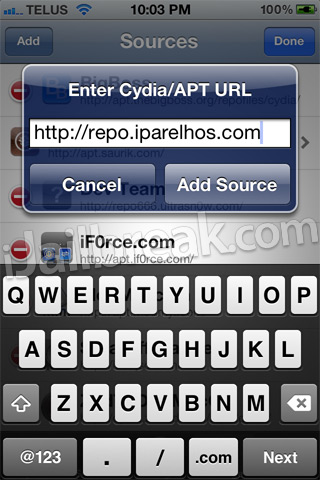
Step 2: Now you will need to launch Cydia so we can add the 3rd party repository UltraSn0w Fixer for 5.1.1 is hosted in. When Cydia is up and running go into the Manage tab, Sources section, tap the edit button and then the add button and add the following source:
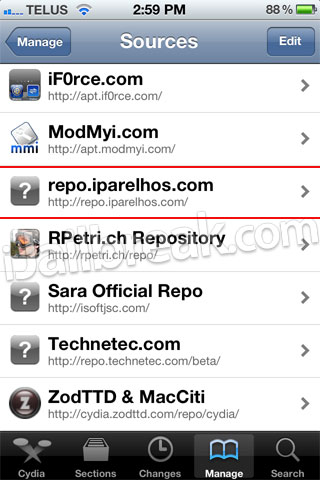
Step 3: With the source successfully added you will need to simply go into the iParelHos repo section.
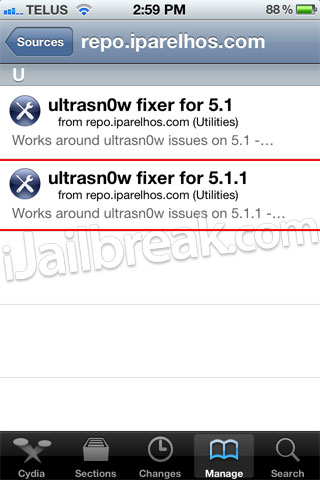
Once you see UltraSn0w Fixer for 5.1.1 simply install it to your iPhone.
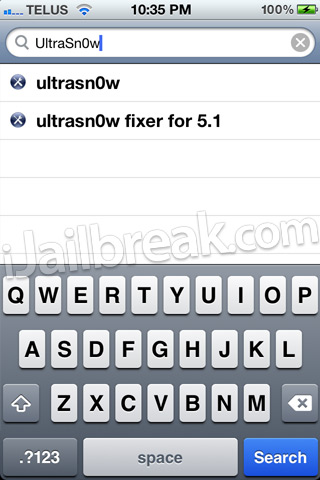
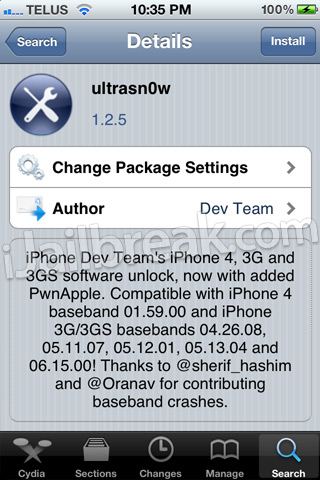
Step 4: When UltraSn0w Fixer has been installed simply go into Cydia’s Search tab and search for UltraSn0w.
After you have searched for it and see it, install it to your iPhone also and reboot.
Congratulations! You have just unlocked your iPhone 4 or iPhone 3GS running the iOS 5.1.1 firmware with UltraSn0w Fixer for 5.1.1. If you are still having troubles make sure you installed UltraSn0w Fixer for 5.1.1 before UltraSn0w. For those that did it in the reverse order you will need to uninstall both packages, reboot your iPhone and follow this how to guide once again. Please leave any further questions or thoughts in the comments section below…
http://www.guarforum.net/gsmreport/s...d.php?t=139777
Monday, September 16, 2013
The Best Motherboard At 2012 For Your PC
The Best Motherboard At 2012 For Your PC - For those of you who want to know the best motherboard 2012 which is suitable for PC gaming, then through this post you can see the complete information. I got the information about this Best Motherboard and the information collected from various sites incyberspace media. Hopefully by the presence of this article can broaden all of us in terms of choosing the Best Motherboard best course at this time.

Complete the following could you see a list of recommended Best Motherboard is best used as a Motherboard in a CPU that is used to play the game:
- Motherboard Asus Rampage II Extreme Specification :
- Multi GPU Support: ATI CrossFire | nVIDIA SLI
- Max System Memory: 12 GB
- Memory Technology: DDR3
- Supported Processor: Intel Core i7
- Processor Socket: Intel Socket B (LGA 1336)
- Price : US$359
- Motherboard XFX NVIDIA GeForce 9300 Desktop Board � MI93007AS9 Specification :
- Memory Standar: DDR2-800/PC2-6400
- Maksimum Memory: 8GB
- Pentium Dual-Core, Core 2 Quad, Pentium D, Processor Support: Celeron, Core 2 Extreme Quad-Core.
- Price US$113
- Motherboard Intel DX58SO Spesification :
- Max System Memory: 8 GB
- Multi GPU Support: ATI CrossFire
- DDR3 Memory Technology
- Supported Processor: Intel Core i7
- Price US$209
- Motherboard ASUS Republic of Gamers Series Rampage Formula ATX Intel Specification:
- Higher Overclockability
- 2-Phase DDR2
- Supported Processor: Intel Core 2 Duo
- Price US$207
- Motherboard MSI Platinum P45D3 Specification :
- SATA
- Socket 775
- Intel P45 Express
- CrossFireX
- Dual-Channel DDR3
- PCI Express 2.0 x16
- Price US$179
Angry Birds Space IPA Is Now Available For iPad And iPhone
AngryBirdsSpace-iPad (v1.0.1 LP)
AngryBirdsSpace-iPhone (v1.0.0 LP)

http://www.guarforum.net/gsmreport/showthread.php?p=172150#post172150
AngryBirdsSpace-iPhone (v1.0.0 LP)
http://www.guarforum.net/gsmreport/showthread.php?p=172150#post172150
Saturday, September 14, 2013
PSN Database 2 2 Million Credit Cards Now For Sale
These really are disturbing news, according to RedmondPie, the PSN hacking issue going to be worse. When we know that database containing around 2.2 million sets of credit card details and they are up to sale to the highest bidder, this really horrible.

Unknown hackers are now extorting Sony by offering to sell them back cridet card details otherwise offering them up on underground credit card trading forums.
Read more...

Unknown hackers are now extorting Sony by offering to sell them back cridet card details otherwise offering them up on underground credit card trading forums.
The really disturbing part of this is the news that these details actually include the CCV security code that until now was believed to be safe. With that code married to the card owner’s name as well as the rest of the card details then the card could be used without a hiccup – news that will no doubt send a shudder down many spines at Sony HQ as well as the70 million plus PSN members who’s data could have been compromised.Warning : If you own a credit card registered in PSN, please keep an eye on it by online banking services, SMS or any other method (Let your friends know).
Ultrasn0w Fixer for 6 0 to unlock iPhone 4 3GS Old Basebands

This is not the official ultrasn0w tool that the iPhone Dev Team created. It’s a package that works with the official tool for supported basebands, those that can be unlocked by the official tool itself. This tool can be used until the official ultrasn0w is updated to unlock iOS 6.
iOS 6 Basebands compatible with ultrasn0w fixer 6.0
Ultrasn0w supports only older basebands, if you want to preserve your iOS 6 baseband you need to use custom firmware with Redsn0w 0.9.15b1 -- read more here.
- Baseband 01.59.00 (iPhone 4)
- Baseband 04.26.08 (iPhone 3GS)
- Baseband 05.11.07 (iPhone 3GS)
- Baseband 05.13.01 (iPhone 3GS)
- Baseband 05.12.01 (iPhone 3GS)
Unlock iOS 6 with ultrasn0w fixer – Guide

Step 4: Tap on the source that you entered in step 3.
Step 5: A package called ultrasn0w fixer for 6.0 will be presented to you. Tap on it to start installation.

Step 6: Download the official ultrasn0w and that’s it.
Congrats! Ultrasn0w fixer will now unlock your iPhone 3GS / iPhone 4 on iOS 6. This will do until the official ultrasn0w is updated. Do keep in mind the ultrasn0w fixer needs to be downloaded before the official tool itself.
Devices compatible with iOS 6 Ultrasn0w fixer
- iPhone 4
- iPhone 3GS
Thursday, September 12, 2013
Get 20 Licenses of Full Version CollageIt Pro for Mac Exclusive Giveaway
Get 20 Licenses of Full Version CollageIt Pro for Mac (Exclusive Giveaway) - Now I will talk about about PearlMountainSoft with 20 permits of CollageIt Pro forWindows. Now PearlMountainSoft collaboration will discuss 20 complete edition certificate of CollageIt Pro for Mac. Generally, CollageIt for Mac marketed $ 19.90. But in an unique free offer occurrence, you have the opportunity to get it for free!

The no cost edition of CollageIt is also available but with its Pro edition you can max out all of its functions including:
- Eliminate watermark on the collage
- No frustrating rush screen!
- Plants picture.
- Eliminate dimension restrict. (Only for Ms windows Version)
- FREE life-time assistance.
CollageIt Pro for Mac is a application you can use to create picture collection simple and quick. You just need three making a enchanting picture collage: submit your picture information, produce structure, organize establishing, and finish! Photo collection you created can be saved in various structure, such as bmp, jpg, png, tga, tif, etc.
It�s real that CollageIt For Mac is also available in no cost edition. But its Pro edition has some benefits such as:
1. License is legitimate permanently.
2. No more distressing watermark in picture collection you created.
3. It can be used to plant photo
4. Free Lifetime assistance.
Cooperating with pearlMountainSoft, we carry free offer occurrence with 20 permits of CollageIt Pro for Mac as its provides. For you who want to get this $19.90 respected application, just keep a statement in the following paragraphs. Like, Plus and Twitter to this content is not a must, but if you do it, I will really appreciate it.
20 champions will get each 1 certificate of CollageIt Pro for Mac. The victorious one will be attracted on the next Nov 30 2011. I wish you luck!
Thank you to PearlMountainSoft for the cooperation and licenses provided for Any Tricks visitors.
Tuesday, September 10, 2013
Remove passcode from iPhone manually with Gecko for user that have errors on Gecko
Hi all,
i had a problem removing a passcode from 3gs with GECKO software it kept giving me the unexpected parameter i error message. So after a lot of tries this is the way i managed to manually load the custom ramdisk and remove the passcode from an 3gs 4.2.1. and 4g 5.0.1 :
1. Download Gecko iPhone Toolkit and install it.
2. Download the newest version of Redn0w place it on c:A folder
3. Download the iPhone2,1_5.0.1_9a405_Restore.ipsw for 3GS or iPhone3,1_5.0.1_9a405_Restore.ipsw for iPhone 4 and place them in c:A
4. Go to C:UsersYOUR_USERNAMEAppDataLocalTemp amdisks and from there copy the 2 files 3gsramdisk.dmg and i4ramdisk.dmg to c:A
5. Connect you iPhone, open Gecko iPhone Toolkit, select your model and press the Boot button. It will give you the unexpected parameter i error.
6. Then press the Start button, and open command prompt by typing CMD
7. Navigate to c:A
8. In command prompt write the following:
For iPhone 3gs:
Redsn0w -i c:AiPhone2,1_5.0.1_9a405_Restore.ipsw -r c:A3gsramdisk.dmg
For iPhone 4:
Redsn0w -i c:AiPhone3,1_5.0.1_9a405_Restore.ipsw -r c:Ai4ramdisk.dmg
6. If you did everything right you should be able to read a big OK on you screen.
7. Press the Launch button (you should be able to see on your phone screen AppleKeyStore:sending) and wait for around 20min, you should be able to see your code.
Hope this helps..
Gecko iPhone Toolkit
// Features \
-- Read iphone user lock code (bypass password WITHOUT restore)
Quote:
Firmware: 4.0, 4.0.1, 4.0.2, 4.1 4.2.1 , 4.3 4.3.1, 4.3.2, 4.3.3, 4.3.4, 4.3.5, 5.0, 5.0.1
Quote:
Devices: iPhone 3GS, iPhone 4, iPad 1, iPod Touch 3G, iPod touch 4G
-- Reset iPhone Disabled (WITHOUT restore)
Quote:
Firmware: 3.X -> 4.0, 4.0.1, 4.0.2, 4.1 4.2.1 , 4.3 4.3.1, 4.3.2, 4.3.3, 4.3.4, 4.3.5, 5.0, 5.0.1
Quote:
Devices: iPhone 3G, iPhone 3GS, iPhone 4, iPad 1, iPod Touch 2G, iPod Touch 3G, iPod Touch 4g
-- Fix Stuck on Apple logo after installing cydia tweak (without restore)
Quote:
Firmware: 3.X -> 4.0, 4.0.1, 4.0.2, 4.1 4.2.1 , 4.3 4.3.1, 4.3.2, 4.3.3, 4.3.4, 4.3.5, 5.0, 5.0.1
.
Quote:
Devices: iPhone 3G, iPhone 3GS, iPhone 4, iPad 1, iPod Touch 2G, iPod Touch 3G, iPod Touch 4g
not possible without: msft guy, 0naj, dev team.
tested on i4 + 3gs / win7 + winxp (thx to jpwest) ..ps program is in very early stages: expect some issues. more improvements + features to be added pending feedback
http://www.4shared.com/get/rS3BIyB0/Gecko_iphone_toolkit.html


Last edited by ednacell; Today at 10:36 PM.
For all in situation of NOT knowing currently baseband in the device
I highly recommend using iFaith to dump SHSH from your phone and create a custom ipsw same version with the existing one in the phone!!!
If that fails for whatever reason there might be a tiny chance to find SHSH on Apple or Cydia servers to fit your needs...
First of all connect your iPhone to computer and put it in Recovery Mode.
Use ECID Grabber (attachment) to get the device ECID. After getting it, copy it to clipboard.
In TinyUmbrella click "Manual ECID". Chose a name in first tab of the little window that opens. In second tab paste previously copyed ECID. In the third tab chose your iDevice type (iPhone3G,....iPhone4...etc). Now click "Create custom device". Your newly created custom device will appear in the left side of TinyUmbrella window in "Custom devices" group. Click on it then hit "Save ALL SHSHs". Give the program some time to communicate with Apple servers and check wheter or not there are SHSHs for your iPhone. After procedure is completed you should check in TinyUmbrellas "Advanced" tab "Request SHSH from Cydia". If youre lucky it might find something there too.
Now that u have some SHSH saved for your device is time to decide which one youll use to do a custom restore. If were talking of iPhone4, ANY shsh higher than 4.3.5 version will be USELESS because for now only basebands lower (or equal) then 04.10 are unlockable using Gevey. So...
Hope youre lucky and have those shsh. If yes:
IREB-pawned dfu,
TinyUmbrella-start tss server
iTunes-shift+restore-select coresponding ipsw(stock or sn0wbreeze customized)-restore
You should have a Working phone without any code and with an unlockable baseband.
Subscribe to:
Posts (Atom)