Showing posts with label you. Show all posts
Showing posts with label you. Show all posts
Thursday, March 13, 2014
Do You Want Cheap Books For Your Classroom
There are so many things I love when it comes to my classroom... without card stock, Velcro, clothespins, magnetic tape and magnetic printer paper, I wouldnt know what to do! Ill definitely detail the infinite uses of all of those things one day, but all of those things being said, there is one thing that I am addicted to more than anything else: childrens books!!!
Take a look at how full my bookshelf is in my classroom!
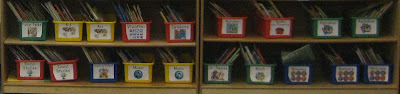
And thats not even all: I have 11 totes full of books in my basement! They are 64 qt. totes and hold 100-200 books!

Obviously, the cost of books can add up quick, especially when we have so many different topics that there are great read alouds for. But, there is a way to get books for your classroom for dirt cheap... library books sales!!! These are probably the best way to build a classroom library!
The best way Ive found library books sales is through this website:

Note: Im not getting paid to promote the website, Im posting it because it honestly is the best!!
Browse through the site to find sales near you. Usually the ones that state "Big Sale!" are pretty good, but only trial and error will really work. You can sign up for a weekly email alerts so youre always aware of the sales in your area (without having to remember to check the website!)
Now, any given day at a library sale is a steal for books... but do you want books for your classroom that are basically free? Of course you do!!!! So you need to go to the book sales on the best day... bag day! Most large library sales have this the last day of their sale. Fill up a whole bag full of books for $5! A lot of places let you even bring your own bag... I get a kick out of people with giant beach bags full of books (ok, so Im usually one of those people but it is funny to watch)!
Not only do I use bag day to stock up on new books for the classroom, but I also use it to fill my treasure chest! The kids just look to bring home books as a prize for their good behavior! I started off this year with two totes full of books for the treasure chest (easily 300 books that I paid a total of $10 for) and all of these books were gone by December! They were the most popular prize as well as the least expensive!
Read more...
Take a look at how full my bookshelf is in my classroom!
And thats not even all: I have 11 totes full of books in my basement! They are 64 qt. totes and hold 100-200 books!
Obviously, the cost of books can add up quick, especially when we have so many different topics that there are great read alouds for. But, there is a way to get books for your classroom for dirt cheap... library books sales!!! These are probably the best way to build a classroom library!
The best way Ive found library books sales is through this website:
Note: Im not getting paid to promote the website, Im posting it because it honestly is the best!!
Browse through the site to find sales near you. Usually the ones that state "Big Sale!" are pretty good, but only trial and error will really work. You can sign up for a weekly email alerts so youre always aware of the sales in your area (without having to remember to check the website!)
Now, any given day at a library sale is a steal for books... but do you want books for your classroom that are basically free? Of course you do!!!! So you need to go to the book sales on the best day... bag day! Most large library sales have this the last day of their sale. Fill up a whole bag full of books for $5! A lot of places let you even bring your own bag... I get a kick out of people with giant beach bags full of books (ok, so Im usually one of those people but it is funny to watch)!
Not only do I use bag day to stock up on new books for the classroom, but I also use it to fill my treasure chest! The kids just look to bring home books as a prize for their good behavior! I started off this year with two totes full of books for the treasure chest (easily 300 books that I paid a total of $10 for) and all of these books were gone by December! They were the most popular prize as well as the least expensive!

Wednesday, October 2, 2013
Here’s how you can try out Windows Phone on your iPhone
Curious to see how Windows Phone feels, but don’t have a device around to do so? Us neither. But Microsoft has just released a new HTML 5 website that allows iPhone and Android users to get a taste of the Windows Phone 7 (Mango 7.5) operating system. The trial requires no downloads or registration, and you can try it out by just going to the webpageWindows Phone Demo on your mobile device.
While it doesn’t use any of the data on your phone like your contacts, the demo does give you a pretty comprehensive look at all of Windows Phone’s features. Microsoft uses a blue dot to guide you around the operating system, and obviously some features like voice recognition just don’t work in the browser. Drat, that’s something we really wanted to try.


Wednesday, September 25, 2013
After you play with iOS 5 you can get back to last release
If you do not want to keep iOS 5 on your phone.
To downgrade:
- Put the phone in DUI mode by plugging it into iTunes, holding the home and lock buttons for 10 seconds then releasing the lock button but not the home button. iTunes will say its detected an iPhone in recovery mode.
- Option-click the "Restore" button, and select the 4.3.3 ipsw file, which you may need to download from here:
Download iOS 4.3.3 / 4.2.8 Direct Download (Official from Apple)
- Restore from your backup and youre sorted.
This is potentially dangerous, but your phone will never be bricked by an Apple released update, even if it is beta. Not unless theres a massive bug, which is always possible, but highly unlikely
Read more...
To downgrade:
- Put the phone in DUI mode by plugging it into iTunes, holding the home and lock buttons for 10 seconds then releasing the lock button but not the home button. iTunes will say its detected an iPhone in recovery mode.
- Option-click the "Restore" button, and select the 4.3.3 ipsw file, which you may need to download from here:
Download iOS 4.3.3 / 4.2.8 Direct Download (Official from Apple)
- iPhone 4 (GSM)
- iPhone 4, iOS 4.2.8 (Verizon)
- iPhone 3GS
- iPad 2 WiFi
- iPad 2 GSM
- iPad 2 CDMA
- iPad
- iPod touch 3G
- iPod touch 4G
- Restore from your backup and youre sorted.
This is potentially dangerous, but your phone will never be bricked by an Apple released update, even if it is beta. Not unless theres a massive bug, which is always possible, but highly unlikely
Monday, September 16, 2013
Do you want to help out developers Got a broken device or UnBrickable iPhone 4 iPad Samsung
by AdamOutler - Recognized Developer [ XDA Developer ]
SOURCE
Read here the WHOLE THREAD
SAMPLE: Samsung UnBrickable
http://www.youtube.com/watch?v=fw-D_cKeAb8&feature=player_embedded
if you can sacrifice the iPhone4 board and the iPad board, then I can remove the processor, get the proper modification documented, and we can move on from there with uploading unsecure code. The first part is to get the device into S5PC110 USB download mode.... this is several levels lower in the boot sequence then the DFU mode (SBL) which is used to reload Apple Software... Apple can patch over jailbreaks, but once we have this, then theres nothing Apple can do.
It is likely that we already have the proper interceptor bootloader ready. Rebellos HIBL may already work with it. The only question is if they have a funky sort of different signature check, in which case it may be necessary to disassemble the firmware and rewrite a HIBL. This is beyond me, however Rebellos is good with this type of stuff.
Send a pm to me.
Also, we are only interested in the devices on the list. The 3/3g/2/original devices are not going to work with this particular mod.. Maybe newer devices.
Im not paying a dime. If you want this modification brought to your platform, then you can fork up the hardware and ill send it back when the work has been completed.
SOURCE
Read here the WHOLE THREAD
SAMPLE: Samsung UnBrickable
http://www.youtube.com/watch?v=fw-D_cKeAb8&feature=player_embedded
Monday, September 9, 2013
Homescreen me lets you share your iOS device setup with the world

And if you like customizing your device, and want to share your iPad or iPhone setup with the world, there’s a new service that lets you do that. Homescreen.me finally came out of private beta this week…
Homescreen.me is a simple service that allows you to show off screenshots of your iOS Home screens. It’s been around for about two years now, but only just became available to the public.
The service is free, and enables you to upload one screenshot for both your iPhone and iPad. There’s also a spot on your landing page to explain your setups — what tweaks, themes you’re using — and there’s a nice Explore feature that allows you to browse through other people’s devices.
That’s pretty much it for Homescreen.me, there’s not much to it. And while the simplicity is nice from a design standpoint, it’s clearly missing some features. Social network integration, for example, would be a handy addition.
Nevertheless, it’s a cool idea. And we encourage you to setup an account. In fact, feel free send us links to your Homescreen.me profiles on Twitter. We’ll retweet the best ones.
Friday, September 6, 2013
New Windows Utility Allows You to Use AirPlay With Windows Media Center

It’s becoming more and more apparent that AirPlay — Apple’s media streaming technology is here for the long haul.
We’ve seen numerous applications for both the iPhone, the Mac, and even Android devices that in some way or another, massage AirPlay’s functionality to meet their needs.
Throughout all of the fun, Windows has ultimately been left out; that is until now.
Developer Thomas Pleasance made sure of that fact with the recent release of his AirPlay enabled Windows Media Center Add-in…

The screenshots definitely show promise, all 12 of you still running Windows Media Center in your living room should be pleased.
I tried to get this working myself, but unfortunately AirPlay doesn’t want to play nice with my Windows 7 Virtual Machine. I’m sure it would work just dandy on an actual Windows installation.
Have you tried it yet? If not, head over to Thomas’ blog and download the necessary files to get started. You will also need Bonjour installed on your machine if you have not already done so.
Thomas Pleasance
My Own Little world
AirPlay for Windows Media Center – Beta 1
Posted: May 23, 2011 | Author: Thomas Pleasance | Filed under: AirPlay, iOS, Media Center | Tags: AirPlay, Media Center | 136 Comments » I’am please to release the first beta of AirPlay For Windows Media Player
Video

Images
Download AirPlay Client for Windows Media Center: http://goo.gl/OEzNm
Or from madeformediacenter.com
You also need Bonjour installed first: http://support.apple.com/kb/DL999
First Review: thedigitallifestyle.com
Subscribe to:
Posts (Atom)