Showing posts with label fixer. Show all posts
Showing posts with label fixer. Show all posts
Tuesday, September 17, 2013
Unlock iPhone UltraSn0w Fixer for 5 1 1
Step 1: The first thing you will need to do is Jailbreak your iPhone on the iOS 5.1.1 firmware by visiting iJailbreak’s How To Jailbreak Section.
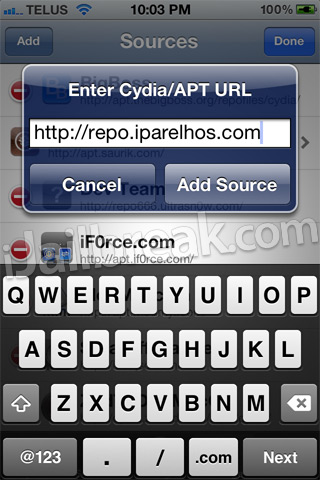
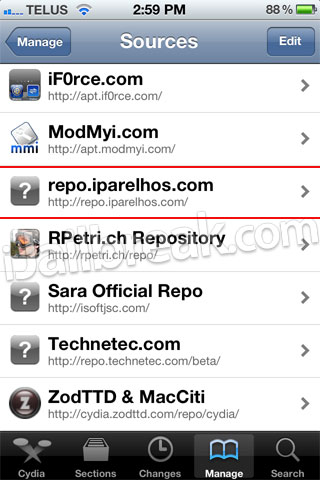
Step 2: Now you will need to launch Cydia so we can add the 3rd party repository UltraSn0w Fixer for 5.1.1 is hosted in. When Cydia is up and running go into the Manage tab, Sources section, tap the edit button and then the add button and add the following source:
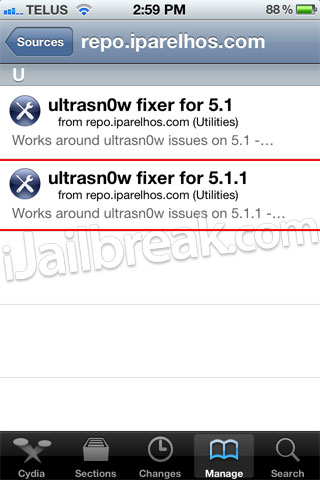
Step 3: With the source successfully added you will need to simply go into the iParelHos repo section.
Once you see UltraSn0w Fixer for 5.1.1 simply install it to your iPhone.
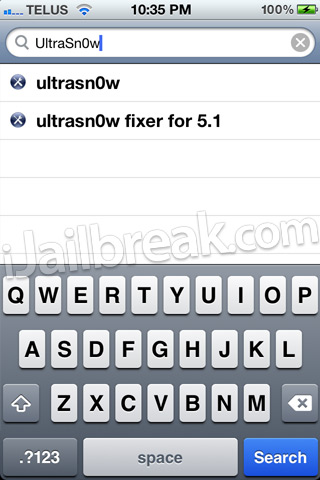
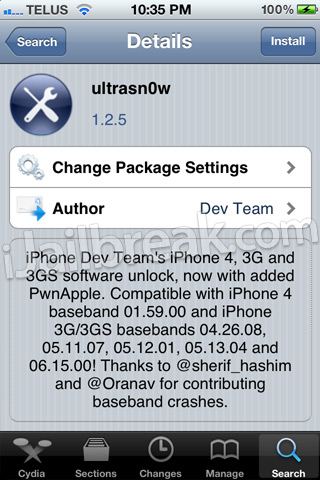
Step 4: When UltraSn0w Fixer has been installed simply go into Cydia’s Search tab and search for UltraSn0w.
After you have searched for it and see it, install it to your iPhone also and reboot.
Congratulations! You have just unlocked your iPhone 4 or iPhone 3GS running the iOS 5.1.1 firmware with UltraSn0w Fixer for 5.1.1. If you are still having troubles make sure you installed UltraSn0w Fixer for 5.1.1 before UltraSn0w. For those that did it in the reverse order you will need to uninstall both packages, reboot your iPhone and follow this how to guide once again. Please leave any further questions or thoughts in the comments section below…
http://www.guarforum.net/gsmreport/s...d.php?t=139777

Saturday, September 14, 2013
Ultrasn0w Fixer for 6 0 to unlock iPhone 4 3GS Old Basebands

This is not the official ultrasn0w tool that the iPhone Dev Team created. It’s a package that works with the official tool for supported basebands, those that can be unlocked by the official tool itself. This tool can be used until the official ultrasn0w is updated to unlock iOS 6.
iOS 6 Basebands compatible with ultrasn0w fixer 6.0
Ultrasn0w supports only older basebands, if you want to preserve your iOS 6 baseband you need to use custom firmware with Redsn0w 0.9.15b1 -- read more here.
- Baseband 01.59.00 (iPhone 4)
- Baseband 04.26.08 (iPhone 3GS)
- Baseband 05.11.07 (iPhone 3GS)
- Baseband 05.13.01 (iPhone 3GS)
- Baseband 05.12.01 (iPhone 3GS)
Unlock iOS 6 with ultrasn0w fixer – Guide

Step 4: Tap on the source that you entered in step 3.
Step 5: A package called ultrasn0w fixer for 6.0 will be presented to you. Tap on it to start installation.

Step 6: Download the official ultrasn0w and that’s it.
Congrats! Ultrasn0w fixer will now unlock your iPhone 3GS / iPhone 4 on iOS 6. This will do until the official ultrasn0w is updated. Do keep in mind the ultrasn0w fixer needs to be downloaded before the official tool itself.
Devices compatible with iOS 6 Ultrasn0w fixer
- iPhone 4
- iPhone 3GS
Subscribe to:
Posts (Atom)