Showing posts with label download. Show all posts
Showing posts with label download. Show all posts
Monday, March 3, 2014
How to Download Videos Off YouTube A Technology Tuesday Post!
Time flies when youre having fun... and it flew all the way to Tuesday again! Thank you for all of your votes again! The winner this week is: How to Download Videos off YouTube.

I do have to say though... all of you blog hoppers really kept me sweating! When I glanced at the poll, I thought it was a three-way tie at first! I wouldnt even know what to do if that were to happen!

Now, Im assuming this goes without saying, but just to be safe: this tutorial is strictly for educational use. By no means can you sell or redistribute the videos you download.
I primarily download YouTube videos for:
There are so many ways to download YouTube Videos, but Im just going to detail my two favorites: one doesnt require you to install any software onto your computer. The other is quicker and more streamline, but requires you to use Firefox.
Now, for the first option: How to download YouTube videos without installing any software. This tutorial uses the website Save Media.

Option Two: The easier way to download YouTube videos (this tutorial only applies to Mozilla Firefox users! This tutorial uses the add-on Flash Got All.)


Be sure to vote for next weeks Technology Tuesday Post! I wonder if it will be a nail-biter again!
Read more...
I do have to say though... all of you blog hoppers really kept me sweating! When I glanced at the poll, I thought it was a three-way tie at first! I wouldnt even know what to do if that were to happen!
Now, Im assuming this goes without saying, but just to be safe: this tutorial is strictly for educational use. By no means can you sell or redistribute the videos you download.
I primarily download YouTube videos for:
- Organization! How nice would it be to have that subtraction song in the "Subtraction" folder on your computer, along with all of the other subtraction resources you have?
- Saving Time! When youre teaching every second is key! The time you spent searching online for a video during class is not as productive as it could be! Redistribute those seconds/minutes to asking higher-order thinking questions about the video!
- Reliability! Even if your internet goes down at work, youll still have access to that great video that you wanted to show the class!
There are so many ways to download YouTube Videos, but Im just going to detail my two favorites: one doesnt require you to install any software onto your computer. The other is quicker and more streamline, but requires you to use Firefox.
Now, for the first option: How to download YouTube videos without installing any software. This tutorial uses the website Save Media.
Option Two: The easier way to download YouTube videos (this tutorial only applies to Mozilla Firefox users! This tutorial uses the add-on Flash Got All.)
You can download this tutorial as a PDF by clicking this picture!
Note: This tutorial is hosted on Google Docs. To save it from there, just open the file and click File > Download to save onto your computer!
Be sure to vote for next weeks Technology Tuesday Post! I wonder if it will be a nail-biter again!

Tuesday, October 8, 2013
iOS 4 3 4 Firmware IPSW Download iPhone 4 3GS iPad 1 2 iPod touch 4G 3G Direct Links
As we expected, Apple has just released iOS 4.3.4 ipsw firmware for iPhone, iPod touch, iPad and Apple TV mainly to patch the security hole that found by Comex in JailbreakMe.

Direct Download Links for iOS 4.3.4 (Official from Apple) :
Read more...
Direct Download Links for iOS 4.3.4 (Official from Apple) :
Saturday, October 5, 2013
Absinthe 2 0 4 Untethered iOS 5 1 1 Jailbreak Download
Absinthe 2.0.4 download is now available. Chronic Dev-Team, in collaboration with the iPhone Dev-Team, has released Absinthe 2.0.4, the untethered iOS 5.1.1 jailbreak for iPhone, iPad and iPod Touch. You can download Absinthe 2.0.4 for Windows, Mac and Linux form the links below…
Absinthe 2.0.4 is compatible with iOS 5.1.1 and is one of the easiest jailbreak solution available to date. Absinthe 2.0.4 is the first jailbreak available for iPad 3 (the new iPad).
Absinthe 2.0.4 Supported Devices:
Absinthe 2.0.4 can jailbreak following devices running iOS 5.1.1):
Note: iPad 2,4 support will be added later has been added in Absinthe 2.0.4. Apple TV 3G is not supported.
iPhone 4S iPad 3 Wifi iPad 2 GSM iPod Touch 4G iPhone 4 iPad 3 CDMA iPad 2 CDMA iPod Touch 3G iPhone 4 CDMA iPad 3 Global iPad 1 Apple TV 2G iPhone 3GS iPad 2 Wifi
We have ‘ll be posting posted detailed step by step instructions to jailbreak iPhone, iPad and iPod Touch with Absinthe 2. Links to download and use Absinthe can be found below…
Download Absinthe 2.0.4
Download iOS 5.1.1
Download Absinthe v2.0.4 for Windows
Download Absinthe v2.0.4 for Mac
Download Absinthe v2.0.4 for Linux
Friday, October 4, 2013
iOS 5 Beta 1 IPSW Download iPhone iPod Touch iPad Direct Links No Devoloper ID
The guys over Jailbreakzone uploaded all iOS 5 firmware ipsw files for iPhone 4, iPhone 3GS, iPod touch 4G, iPod touch 3G, iPad 1, iPad 2 and Apple TV 2G.

Important notes:
------ Guide: How To Install iOS 5 -------
Cant wait for iOS 5 release this fall and you dont have a developer account? We have good news, you can get your hands dirty now thanks to the powers of the internet. You can now install iOS 5 on your iOS device without need to a developer account, yes you wont need it.

Guide:
STEP 1: Install iTunes 10.5 beta from direct link here. [Mac - Windows 32 bit - Windows 64 bit]
STEP 2: Now you need to download the right firmware file for your iOS device:
STEP 3: Now open iTunes that you downloaded above and restore using your firmware.
you need to activate with original simcard .
Warning: Only Factory Unlock Phone ( Jailbreak & Unltrasn0w Unlocker Stay Away )
Upgrade to iOS 5 - iPhone 4, 3GS, iPod touch 4G, 3G, iPad 1, 2 - Without a Developer Account!
Read more...

Important notes:
- Please note that this is iOS 5 beta 1 for SDK, and no there is no jailbreak available for iOS 5 so far.
- Your device will need to be activated, you can activate your device by going to iOS Activations for that. Install a beta on a non-activated device will render it useless.
Apple TV 2G (4.4, 303.55MB)
iPad 1G (669.66MB)
iPad 2 (WiFi, 677.89MB)
iPad 2 (GSM, 685.17MB)
- Multiupload (direct)
- Megaupload (not done uploading)
- Depositfiles
- Filesonic
- Fileserve
iPad 2 (CDMA, 691.77MB)
- Multiupload (direct)
- Megaupload (not done uploading)
- Depositfiles
- Filesonic
- Fileserve
iPhone 3GS (609.2MB)
- Multiupload (direct)
- Megaupload (not done uploading)
- Depositfiles
- Filesonic
- Fileserve
iPhone 4 (GSM, 730.2MB)
- Multiupload (direct)
- Megaupload (not done uploading)
- Depositfiles
- Filesonic
- Fileserve
iPhone 4 (CDMA, 744.01MB)
- Multiupload (direct)
- Megaupload (not done uploading)
- Depositfiles
- Filesonic
- Fileserve
iPod Touch 3G (578.16MB)
- Multiupload (direct)
- Megaupload (not done uploading)
- Depositfiles
- Filesonic (not done uploading)
- Fileserve
iPod Touch 4G (717.74MB)
- Multiupload (direct)
- Megaupload (not done uploading)
- Depositfiles
- Fileserve
iTunes 10.5 (Mac OS X, 71.55MB)
iTunes 10.5 (Windows x86/32-bit, 72.48MB)
iTunes 10.5 (Windows x64(64-bit, 74.07MB)
------ Guide: How To Install iOS 5 -------
Cant wait for iOS 5 release this fall and you dont have a developer account? We have good news, you can get your hands dirty now thanks to the powers of the internet. You can now install iOS 5 on your iOS device without need to a developer account, yes you wont need it.

Guide:
STEP 1: Install iTunes 10.5 beta from direct link here. [Mac - Windows 32 bit - Windows 64 bit]
STEP 2: Now you need to download the right firmware file for your iOS device:
STEP 3: Now open iTunes that you downloaded above and restore using your firmware.
you need to activate with original simcard .
Warning: Only Factory Unlock Phone ( Jailbreak & Unltrasn0w Unlocker Stay Away )
Upgrade to iOS 5 - iPhone 4, 3GS, iPod touch 4G, 3G, iPad 1, 2 - Without a Developer Account!
Its been less than 2 days and iOS5 is already cracked! Non developers can now install the iOS 5 beta on their iPhones.

This backdoor uses a security exploit in the activation screen.
How to upgrade to iOS 5 for iPhone 4,3GS ,iPod touch 4G, 3G and iPad 1, 2:
Step 1: Download the iOS 5 IPSW file for iPhone 4 and iTunes 10.5 -
Step 2: Install iTunes from the downloaded DMG file.
Step 3: Update your phone with itunes by connecting it and clicking on the "Check for Update" button while holding down the Option key (Shift on a PC). Select the iOS5 IPSW you just downloaded and confirm.
How to Activate iOS 5 without developer account
Step 1: Triple click the home button to activate Voice Over
Step 2: Triple click the home button and Emergency Call will appear.
Step 3: Click on Emergency Call and, while its switching, swipe with your three fingers down.
Step 4: The Notification Center will appear!
Step 5: Click on the Weather widget and wait for the weather app to load.
Step 6: Click on the home button to exit to the iPhones springboard.
There you go! Your iPhone is now running iOS 5.
Mac OS X 10 6 7 Released Download Now
Apple has just released new update to Snow Leopard Mac OS X 10.6.7 which brings a number of fixes. The new update is recommended for all users running Mac OS X Snow Leopard .

Read more...
The 10.6.7 Update is recommended for all users running Mac OS X Snow Leopard and includes general operating system fixes that enhance the stability, compatibility, and security of your Mac, including fixes that:Download Mac OS X v10.6.7 Update
- Improve the reliability of Back to My Mac
- Resolve an issue when transferring files to certain SMB servers
- Address various minor Mac App Store bugs
For detailed information on this update, please visit this website: http://support.apple.com/kb/HT4472.
For information on the security content of this update, please visit: http://support.apple.com/kb/HT1222.
Wednesday, October 2, 2013
Download iOS 5 1 Beta 2 Firmware IPSW iPhone 4S 4
Download iOS 5.1 firmware beta 2 for developers. Apple has just seeded iOS 5.1 beta 2 for developers with build number 9B5127c. The major update on iOS 5.1 beta 2 is the feature related to the management of photos in the Photo Stream.

Download iOS 5.1 Beta 2 for iPhone 4S, 4, 3GS, iPod Touch 4G, 3G, iPad 2, 1 (Developers Only)

Along with iOS 5.1 for iPhone 4S, 4, 3GS, iPod touch 4G, 3G, iPad 2 and iPad 1, Apple released new version of Xcode 4.3 and Apple TV.
NEW: Photos taken using iOS 5.1 can be deleted from Photo Stream on your device and will be removed automatically from Photo Stream on your other iOS 5.1 devices. Older photos can be manually deleted from your iOS 5.1 devices.
Download iOS 5.1 Beta 2 for iPhone 4S, 4, 3GS, iPod Touch 4G, 3G, iPad 2, 1 (Developers Only)
Sunday, September 29, 2013
iREB RC4 Available for Download Fixes 1604 1603 1602 1601 1600 Error
iH8sn0w, the well-known iPhone hacker has announced the release of iREB RC4. This is the new updated version of iREB which bypasses 1604, 1603, 1602, 1601, 1600 errors in iTunes. Now you can use this app on both iOS 3.x and iOS 4.x.
For your kind information using iREB you can load custom firmware on your iOS device by putting it in a pwned DFU state. Also you can use this app to kick your iOS device out of recovery mode.
Download iREB RC4 for Windows.

Friday, September 27, 2013
Free Download DVDStyler Portable Edition 2 0
Free Download DVDStyler Portable Edition 2.0 - DVDStyler Convenient Version 2.0 is a relatively filter, effective and wieldy to bag program that allows you to reproduce your own DVDs and fire them to movie.
Being the portable resource of the application, the most necessary information is its mobility, of course. This is a significant advantage now you believe in work undeniable suppress you wherever you want on an USB keep. You care domiciliate content on chew pc that has Windows in that an os, point sincere and and so remove the containing directory. This street, not define of you using that pc will buy for forsaken tardy. DVDStyler Convenient is complete if you need to career a pc that does not fit in with you and never hunger want that person to identify, or tidily never craving for food to sort your pc down cover up something you use on time.
DVDStyler Convenient Version 2.0 is has an user-friendly individual interface and is very no trouble to handle. Corporeal is example for newbies through current offers all the crucial products for creating a DVD for the access stable. Combined if you never used this easygoing of program, you will yes carry the compromise of sincere magnetism a quickly behavior. Nevertheless, the program provides a never-ending guide that gives you all the basic guidelines to predispose you immediate. From competent all you obtain to take on is transfer your video clips and execute the required strategy to strategy the best DVD undifferentiated since disjoining the producing into sections, appropriate the choices, add subtitles or sound, earmark the options and kindle system to movie.
DVDStyler Convenient Version 2.0 responsibility personify personalized because discovered are a lot of dialects available for its main individual interface, and you culpability appropriate section comparative to start the DVD goods. You responsibility again succeed the issue, besides you responsibility decided to factor single of the engaged layouts. The transformation and losing development will not allow you division complications seeing sensible fast and confused disruptions. I responsibility confess, DVDStyler Convenient may not steward the most complete DVD development device on the bazaar, but it�s overall if you desire a refined program that work offer used because a overdue option for other special packages. And cover up the discharge of non-fiction 2 of the application you will satisfaction in different a persons factor not as opposed to now pristine brighten layouts, flotation for multiline control buttons and others.
Being the portable resource of the application, the most necessary information is its mobility, of course. This is a significant advantage now you believe in work undeniable suppress you wherever you want on an USB keep. You care domiciliate content on chew pc that has Windows in that an os, point sincere and and so remove the containing directory. This street, not define of you using that pc will buy for forsaken tardy. DVDStyler Convenient is complete if you need to career a pc that does not fit in with you and never hunger want that person to identify, or tidily never craving for food to sort your pc down cover up something you use on time.
DVDStyler Convenient Version 2.0 is has an user-friendly individual interface and is very no trouble to handle. Corporeal is example for newbies through current offers all the crucial products for creating a DVD for the access stable. Combined if you never used this easygoing of program, you will yes carry the compromise of sincere magnetism a quickly behavior. Nevertheless, the program provides a never-ending guide that gives you all the basic guidelines to predispose you immediate. From competent all you obtain to take on is transfer your video clips and execute the required strategy to strategy the best DVD undifferentiated since disjoining the producing into sections, appropriate the choices, add subtitles or sound, earmark the options and kindle system to movie.
DVDStyler Convenient Version 2.0 responsibility personify personalized because discovered are a lot of dialects available for its main individual interface, and you culpability appropriate section comparative to start the DVD goods. You responsibility again succeed the issue, besides you responsibility decided to factor single of the engaged layouts. The transformation and losing development will not allow you division complications seeing sensible fast and confused disruptions. I responsibility confess, DVDStyler Convenient may not steward the most complete DVD development device on the bazaar, but it�s overall if you desire a refined program that work offer used because a overdue option for other special packages. And cover up the discharge of non-fiction 2 of the application you will satisfaction in different a persons factor not as opposed to now pristine brighten layouts, flotation for multiline control buttons and others.
Saturday, September 21, 2013
Trick How to Download from Youtube without Software

The excess is, can view and upload videos that we like, as a venue for self-promotion, can download any video, streaming can learn, there are a lot of HD useful video size, can be downloaded, and the video a lot.
The drawback can be abused users, a lot of misleading information, many states are blocked Youtube, because so many are free to upload videos that are useless or uploaded pornographic videos, pictures choked stagnant, lots of video with bad quality,not suitable for slow connection, can not direct download.
To download the file from youtube there are various methods of using auxiliary software or no software at all. Any tricks this time will be sharing how to download videos from youtube without any software.
This method is suitable for you who do not have the IDM or FDM or another download software. Only by following the step by step how to download videos from youtube without any software from this blog, you will have a collection of videos from Youtube with great ease.
Let us refer to:
- At Mozzila firefox Find the video you want
- Play to finish
- Find the address of the video cache file in your computer by:
- Type about: cache? Device = disk in your browser, note the information that appears
- Find a location in its cache, for example in, C: Documents and Settings Local Settings Application Data Mozilla Firefox Profiles 0mnutok6.default Cache (each computer is different location, adjust your stay)
- Block location and then copy (press crtl + c on your keyboard)
- Come in Windows Explorer by pressing Windows + E key combination (or right click on the start button select explore ...)
- Paste (ctrl + v) the location of the cache in windows explorer in the address
- Find the location of the cache files are large (typically more than 3 Mb)
- Change the file extension with add. Flv behind by:
- Example its cache file named 3FHMMKd1
- Right-click on the file, select Rename
- Add ". Flv" (without the quotes) behind file so that it becomes 3FHMMKd1.flv
- Try playing the file using your media player, if it is true that the video you want immediately move the file into another folder.
Quick tips to see and change the file name extension: make it easier to go into windows explorer, press simultaneously ALT + T, choose Folder Options, then select the View tab, Uncheck Hide Extensions for Known File Types. Select Apply and then OK.
Tricks How to Download from Youtube without Software, wish help you. Thank you for your visit, may make us useful online computer learning
advantages:
- can view and upload videos that we like
- as a venue for self promotion
- can download any video
- streaming can learn many useful video
- There are HD size, can be downloaded
- the video a lot
Tuesday, September 17, 2013
Redsn0w 0 9 8b7 Can Jailbreak iOS and 5 Beta 7 Download Links Here!
Yesterday, Apple has seeded iOS 5 Beta 7 for developers. Many would now be looking for a jailbreak for the new update. Well MuscleNerd has announced on his twitter account that the just released Redsn0w 09.8b7 can jailbreak iOS 5 Beta 7.

Of course you will have to point Redsn0w to iOS 5 Beta 6 IPSW firmware not the new one.
Here is our tutorial on how to use Redsn0w To Jailbreak iOS 5 Beta 1 and you can follow the same steps for Beta 7.
Download Redsn0w 0.9.8b7 For Windows / Mac
Apple releases iOS 5 Beta 7 Download Links Here!


Of course you will have to point Redsn0w to iOS 5 Beta 6 IPSW firmware not the new one.
Here is our tutorial on how to use Redsn0w To Jailbreak iOS 5 Beta 1 and you can follow the same steps for Beta 7.
Download Redsn0w 0.9.8b7 For Windows / Mac
Apple releases iOS 5 Beta 7 Download Links Here!
DMG Links:
iPad 2 WiFi + 3G (GSM)
iPad 2 WiFi + 3G (CDMA)
iPad (WiFi and WiFi + 3G)
iPhone 4 (GSM)
iPhone 4 (CDMA)
iPhone 3GS
iPod Touch (3rd Generation)
iPod Touch (4th Generation)
AppleTV
IPSW Links:
iMZDL: iOS 5 & Mac OS X 10.7
iTunes 10.5Beta7
Apple Mac OS X
Microsoft Windows
Microsoft Windows 64-bit
Safari 5.1.1
Update for Microsoft Windows
Update for Apple Mac OS X Lion
Apple Mac OS X Lion Uninstaller
iPad 2 WiFi + 3G (GSM)
iPad 2 WiFi + 3G (CDMA)
iPad (WiFi and WiFi + 3G)
iPhone 4 (GSM)
iPhone 4 (CDMA)
iPhone 3GS
iPod Touch (3rd Generation)
iPod Touch (4th Generation)
AppleTV
IPSW Links:
iMZDL: iOS 5 & Mac OS X 10.7
iTunes 10.5Beta7
Apple Mac OS X
Microsoft Windows
Microsoft Windows 64-bit
Safari 5.1.1
Update for Microsoft Windows
Update for Apple Mac OS X Lion
Apple Mac OS X Lion Uninstaller
WHATS New in IOS 5 beta7The following issues relate to using the 5.0 SDK to develop code.
Accounts
When creating an iCloud account, you can use any Apple ID as long as it is a full email address and not a MobileMe account. If you have a MobileMe account, you can move that account to iCloud. You can find more information on iCloud at: http://developer.apple.com/icloud
AirPlay
Starting in iOS 5, video content in applications and websites are AirPlay-enabled by default.
iOS 5 supports AirPlay of video via AV Foundation.
API Validation
NEW: Starting in iOS 5.0 development tools beta 7, it is possible to extract APIs used by an application and have them checked for private APIs usage. This option will be offered at Validation time.
Apple TV
Apple TV Software beta enables users to mirror the contents of an iPad 2 to an Apple TV (2nd generation) using AirPlay. This beta software also enables Photo Stream on Apple TV so users can access photos stored in iCloud. Apple TV Software beta is being provided to test the latest AirPlay functionality with your iOS 5 apps and web sites. If you wish to install Apple TV Software beta on your device, you must first register your device UDID in the iOS Developer Program Portal.
Slideshow settings are not remembered for slideshow playback (always plays back in Reflections theme). Screen savers settings are behaving properly.
Binary Compatibility
On applications linked against the iOS 5.0 SDK, scroll view content offsets will no longer be rounded to integral pixels during a pinch gesture.
Calendar
Birthday calendars are not currently available via the icloud.com website or in Windows. They will be available in a future release.
Core Image
Several filters have been added since beta 1. The current list now includes the following filters:
CIAdditionCompositing, CIAffineTransform, CICheckerboardGenerator, CIColorBlendMode, CIColorBurnBlendMode, CIColorControls, CIColorCube, CIColorDodgeBlendMode, CIColorInvert, CIColorMatrix, CIColorMonochrome, CIConstantColorGenerator, CICrop, CIDarkenBlendMode, CIDifferenceBlendMode, CIExclusionBlendMode, CIExposureAdjust, CIFalseColor, CIGammaAdjust, CIGaussianGradient, CIHardLightBlendMode, CIHighlightShadowAdjust, CIHueAdjust, CIHueBlendMode, CILightenBlendMode, CILinearGradient, CILuminosityBlendMode, CIMaximumCompositing, CIMinimumCompositing, CIMultiplyBlendMode, CIMultiplyCompositing, CIOverlayBlendMode, CIRadialGradient, CISaturationBlendMode, CIScreenBlendMode, CISepiaTone, CISoftLightBlendMode, CISourceAtopCompositing, CISourceInCompositing, CISourceOutCompositing, CISourceOverCompositing, CIStraightenFilter, CIStripesGenerator, CITemperatureAndTint, CIToneCurve, CIVibrance, CIVignette, and CIWhitePointAdjust
iBooks
iBooks 1.2.2 may fail to display some text or images in books. Please update to iBooks 1.3 in the App Store.
iCloud Backup
If you enable iCloud Backup, automatic backup with iTunes when syncing will be disabled. We also suggest that you manually back up your device with iTunes. Backups made with earlier versions of iOS 5 beta will soon become incompatible, and will no longer be available. It is strongly advised you upgrade to this version of the iOS 5 beta in order to continue backing up your devices.
iCloud Storage
NEW: Starting in iOS 5 beta 7, the requirements for specifying container identifier strings in your applications entitlements have changed. Each container identifier that does not include a wildcard character must exactly match the bundle identifier of an application published using the same team ID as your application. You are not required to include an entitlement that matches your app’s own bundle identifier; for example, a lite and pro version of your app could both specify the pro app’s bundle identifier to share the same container. The requirements for container identifiers that include wildcard characters have not changed, but you may need to update existing wildcard identifiers after changing any non-wildcard identifiers in your applications entitlements to match the new rules.
NEW: In this beta of iOS 5.0 the number of times an app can synchronize in quick succession with the servers has been reduced. If you are debugging your app and want to see whether your synchronize requests are being throttled, you can call the -[NSUbiquitousKeyValueStore _printDebugDescription] method directly in gdb. Please note that -[NSUbiquitousKeyValueStore _printDebugDescription] is an SPI so you are strongly advised not to use it in your app.
On KVS, the per-key limit has been raised to 64Kb (to match the per-app limit); and the maximum number of keys has been raised to 256.
During the iOS 5 beta period, any documents stored on the servers might be purged periodically before GM. Therefore, it is highly recommended that you do not store any critical documents or information on the servers.
Provisioning Profiles no longer need to be enabled for iCloud in the iOS Provisioning Portal. All newly generated provisioning profiles are now automatically enabled for iCloud. If you are using an Xcode managed Team Provisioning Profile, click refresh in the Xcode Organizer to obtain a new iCloud-enabled profile. To enable all other provisioning profiles for iCloud, simply regenerate your profiles in the iOS Provisioning Portal.
If your application is using the NSMetadataQuery class, you must set a predicate, the predicate is now honored. But the predicate is an NSPredicate-style predicate, not a Spotlight-style predicate an example of this is that you must use LIKE instead of = for wild card matching. The differences are defined in more detail at: Loading
In this beta, the setSortDescriptors: method of NSMetadataQuery is not supported.
To use iCloud prior to beta 5, you had to manually specify various container identifiers (your application’s Display set) within an Entitlements file for both of your Mac OS X and iOS projects.
Starting in beta 5, to enable iCloud storage within your apps, simply click the “Enable Entitlements” checkbox in the Summary pane of your project. Xcode will create a custom entitlements file for your project that automatically includes your Team ID. You can add additional iCloud Container values as required by your application. (Note that you must regenerate your existing provisioning profiles, either with Xcode or in the iOS Provisioning Portal, to use iCloud storage.)
If you specify a custom identifier string for your iCloud Key-Value Store or iCloud Container entitlement values, you no longer need to prepend your Team ID to the beginning of the string. Xcode will prepend your Team ID to these entries automatically
The container identifier string you pass to the URLForUbiquityContainerIdentifier: method of NSFileManager MUST include the team ID at the beginning of the string. As a convenience, if you pass nil, Foundation uses the first document container ID specified in your app’s entitlements.
There are issues using the Cloud Storage document API in conjunction with protected data which can lead to data corruption.
In this beta, file presenters (objects that adopt the NSFilePresenter protocol) do not receive some of the messages that theyre supposed to receive, especially:
presentedSubitemDidAppearAtURL:
presentedSubitemDidChangeAtURL:
You can workaround this by implementing the relinquishPresentedItemToWriter: method and checking to see if the writer actually wrote when your file presenter reacquires.
File presenters do receive presentedItemDidChange: messages in this beta.
While reporting a bug related to the iCloud storage interfaces, please include the logs collected during your debugging session. To generate these logs, you must install a special debug profile on your device.
The debug profile can be obtained from Sign in with your Apple ID - Apple Developer. This profile enables the generation of debug logs that are needed to diagnose any problems using iCloud storage. The instructions to collect the logs are:
Install the profile. (The easiest way to do this is to mail it to yourself and open the attachment on their device.)
Reproduce the bug.
Sync with iTunes to pull the logs off your device.
Attach the logs to your bug report. You can find the logs in ~/Library/Logs/CrashReporter/MobileDevice/DeviceName/DiagnosticLogs.
These logs can grow large very quickly, so you should remove the profile after you have reproduced the problem and pulled the logs for the bug report.
File names are case-insensitive in OS X but case-sensitive in iOS. This can lead to problems when syncing files between the two. You should take steps on iOS to avoid creating files whose names differ only by case.
Find My iPhone
After OTA update Find My iPhone does not work. To make it functional you can toggle the the Find My iPhone from OFF to ON in Settings.
GameKit
NEW: Auto-matching with the Turn-based view controller does not work. Invites or the direct auto-match API can be used as a workaround.
Match data for turn based matches is currently limited to 4 KB of data.
FIXED: Events will be passed to the delegate whenever a turn is made on a match, instead of just when it becomes the local players turn.
iMessage
iMessage beta 1 will be unable to communicate with iMessage users on beta 2 or later.
FIXED:Setup Assistant does not provide AppleID password as an input for the FaceTime in iMessage.
interface Builder
FIXED: When editing the value of a constraint in the inspector, the constraint remains selected, and the outline view continues to show the constraint as selected.
In XCode 4.2 when copying views (either a single view or multiple views), both the user defined constraints directly on the selected view and the user defined constraints between the views being copied are copied to the pasteboard.
Changing the segment style of an NSSegmentedControl object to "Automatic" might crash in documents using Cocoa Auto Layout. To workaround the issue use an explicit segment style such as Round or Textured, and at runtime, change the segment style to automatic using the setSegmentStyle: method.
iTunes
NEW: When trying to restore an iPhone 3GS or iPod touch 3rd generation device running Beta 6 to Beta 7 using iTunes, you will have to set the device into DFU or you can OTA update to Beta 7. To enter DFU mode you will have to:
Connect the device to USB on your Mac.
Turn the device off.
Launch iTunes on your Mac.
Hold down the Home and Power buttons for 10 seconds.
Continue holding the Home button but let go of the Power button.
Hold Home button for 13 seconds or until the device shows up in iTunes.
The version of iTunes that comes with beta 7 cannot sync devices that have the beta 6 software installed. To avoid this problem, do the following:
Sync any devices that have beta 6 installed to the version of iTunes that came with beta 6.
Upgrade iTunes to the version that comes with beta 7.
Connect the device and install the beta 7 software. (Understand that you might see a failure to sync error when you first connect the device.)
After installing the beta 7 software, restore from your the backup you made in step 1.
Mail
When changing the host name of an email account in settings, blank messages may be seen in the unified inbox. As a workaround, delete and re-add the account instead of changing its host name.
Music Player
When deleting a song or video from Music/Videos on the device it crashes the app.
OpenGLES
FIXED: After the lighting stage, whether lighting is enabled or not, the resulting color values are not clamped in GLKit/GLKEffects with either GLKLightingTypePerVertex or GLKLightingTypePerPixel set on the effect. As a result it is not uncommon to see differences in lighting between the two, especially when multiple lights are enabled. This differs from OpenGLES 1.1 which clamps color values after the lighting stage regardless of whether or not lighting is enabled.
OTA Software Update
Users who installed iOS 5 beta 6 over the air from iOS 5 beta 3 must first erase all content and settings by choosing Settings > General > Reset > Erase All Content and Settings in order to install iOS 5 beta 7 over the air. This only impacts users who did not update to iOS 5 beta 4.
If you are doing an OTA software update, you will need to re-sync your photos with iTunes."
FIXED: There may be some cases where purchases from the App Store or iTunes Store appear to be stalled because the device is downloading something else in the background. A workaround is to disconnect the device from power (unplug the device).
NEW: If you have a passcode set, it must be removed before updating to seed 7 from previous seeds. It can be re-enabled after the update is complete. Failure to do so may require iMessage to be re-enabled in settings.
Reminders
FIXED: If reminders syncing is enabled for a Yahoo account and there is no reminders collection on the server, it will continually get recreated by the phone. Due to a Yahoo server bug, that collection will show up as an event calendar.
Security
In iOS 5.0 signing of certificates with MD5 signatures is not supported. Please ensure that certificates use signature algorithms based on SHA1 or SHA2.
Simulator
Location services are not functional in iOS 4.3 simulator running on Mac OS 10.7 with Xcode 4.2.
Springboard
Push and local notifications for apps appear in the new Notification Center in iOS 5. Notification Center displays notifications that are considered "unread.” In order to accommodate push and local notifications that have no "unread" status, developers can use their application badge count to trigger a clearing of notifications from Notification Center. When an application clears its badge count (by setting it to zero), iOS 5 will clear its notifications from Notification Center.
UI Automation
There is a known issue when using the performTaskOnHost API in a UI Automation script. If the task being performed with the API outputs excessively (say, thousands of lines of text) to standard out or standard error, the task may deadlock until the timeout is reached, at which point it will throw a javascript exception.
The lock() and unlock() functions of UIATarget have been replaced with the lockForDuration(<seconds>) function.
Starting in iOS 5 beta 2, you can now trigger the execution of an UI Automation script on an iOS device from the host terminal by using the instruments tool. The command is:
instruments -w <device id> -t <template> <application>
When using the cli instruments for UI Automation you can now target the default Automation Template and pass the script and results path into the tool as environment variable options. For example:
instruments -w <device id> -t /Developer/Platforms/iPhoneOS.platform/Developer/Library/Instruments/PlugIns/AutomationInstrument.bundle/Contents/Resources/Automation.tracetemplate <application> -e UIASCRIPT <script> -e UIARESULTSPATH <results path>
UIKit
In iOS 5.0 UIPickerView doesnt send its pickerView:didSelectRow:inComponent: delegate message due to a programatic selection.
Starting in iOS 5 beta 3, the exclusiveTouch property of UIControl has returned to its original default value of NO.
Returning nil from the tableView:viewForHeaderInSection: method (or its footer equivalent) is no longer sufficient to hide a header. You must override tableView:heightForHeaderInSection: and return 0.0 to hide a header.
In the iOS 5 beta, the UITableView class has two methods to move one cell from one row to another with defined parameters. These APIs are:
moveSection:toSection:
moveRowAtIndexPath:toIndexPath:
Using the UIWebView class in Interface Builder, setting transparent background color is possible in iOS 5. Developers compiling against the new SDK can check their XIB for the UIWebView transparent setting.
In the iOS 5 beta, the UINavigationBar, UIToolbar, and UITabBar implementations have changed so that the drawRect: method is not called on instances of these classes unless it is implemented in a subclass. Apps that have re-implemented drawRect: in a category on any of these classes will find that the drawRect: method isnt called. UIKit does link-checking to keep the method from being called in apps linked before iOS 5 but does not support this design on iOS 5 or later. Apps can either:
Use the customization API for bars that in iOS 5 and later, which is the preferred way.
Subclass UINavigationBar (or the other bar classes) and override drawRect: in the subclass.
The indexPathForRow:inSection:, section, and row methods of NSIndexPath now use NSInteger instead of NSUInteger, so that these types match with methods defined on UITableView.
We have changed the behavior of scrollToRowAtIndexPath:atScrollPosition:animated: such that UITableViewScrollPositionTop and UITableViewScrollPositionBottom now adjust for the top and bottom portions of the contentInset property.
NEW: In releases prior to iOS 5.0, the UIPopoverController class would unconditionally set the autoresizing masks of view controllers which were the content view controller of the popover controller. It would also unconditionally set the autoresizing masks of the views of view controllers pushed on to a UINavigationController object which was the content view controller of the popover controller.
In iOS 5.0, the UIPopoverController class will no longer do this for applications linked on iOS 5.0 or later. Developers should ensure that the autoresizing masks of views are set properly to allow for arbitrary resizing within any container, not just popovers. A mask of (UIViewAutoresizingFlexibleWidth | UIViewAutoresizingFlexibleHeight) would not be unreasonable.
The completion handler for saveToURL:forSaveOperation:completionHandler: is now being called outside of the coordinated write block, where it used to be called inside.
FIXED: The autosaveWithCompletionHandler: method will now only be called for period-based saves and it is safe to return without saving. Documents must save, though, if the saveToURL:forSaveOperation:completionHandler: method is invoked.
Safari and WebKit
In iOS 5, a new inherited CSS property, -webkit-overflow-scrolling, is available. The value touch allows the web developer to opt in to native-style scrolling in an overflow:scroll element. The default value for this property is auto, which allows single-finger scrolling without momentum.
The WebKit framework has picked up a newer WebKit engine, which closely matches Safari 5.1. Some areas to be aware of with the new WebKit framework on iOS:
There is a new HTML5-compliant parser.
Text layout width may change slightly because word-rounding behavior now has floating-point-based precision.
There is improved validation of the <input type=number> form field, which includes removing leading zeros and number formatting.
Touch events are now supported on input fields.
window.onerror is now supported.
There is a new user agent that does not have locale information in the User Agent string.
URLs are now canonicalized by making the scheme all lowercase. If a fake URL is used to pass information from a UIWebView back to native code, make sure that the scheme is always lowercase, or that the native code compares the scheme in a case-insensitive manner.
Wi-Fi Syncing
In iOS 5 beta 4 and later, wireless syncing is now available on Windows as well as the Mac. (This support requires OS X 10.6.8 or Lion.) You will see an option to enable wireless syncing when you connect your device to iTunes with the USB cable. It is recommended you perform your initial sync with a cable after restoring your device.
Wireless syncing is triggered automatically when the device is connected to power and on the same network as the paired computer. Or, you can manually trigger a sync from iTunes or from Settings > General > iTunes Sync (same network as paired computer required).
If you find issues with apps, media and/or photos synced to your device, you can reset then resync. From Settings > General > Reset, choose Erase all Content and Settings. Then reconnect to iTunes and sync again.
Xcode
NEW: Starting with Xcode 4.2 in iOS 5.0 beta 7, support to run and debug applications in the iOS 4.3 Simulator and on devices with iOS versions older than 4.2 is made optional and installed on demand. This support is no longer shipped as part of the core tools packaging, and made available for download and installation through the "Downloads" pane of the Xcode Preferences panel. A valid iOS developer ADC account is required to obtain this content.
To obtain the iOS 4.3 Simulator, select the "More Simulators…" item from the Run Destinations popup in the main toolbar. This will present the Downloads pane of the Preferences with UI to initiate the installation of the simulator.
To obtain iOS device support for pre-iOS 4.2 devices, connect a device and activate it for development in the Organizer. Xcode will provide a prompt to initiate the download of the device support components.
If the Xcode 4.2 in iOS 5.0 beta 7 is installed over a previous Xcode 4.2 beta or Xcode 4.1, the iOS 4.3 Simulator and device support from the previous install will already be present, and the additional components will display as "Installed" in the Downloads pane of the Xcode Preferences.
The installation packages for the downloaded components will be stored in ~Library/Developer/Xcode. When a new version of Xcode (beta or GM) will be installed, subsequent requests to install these components will use the local packages without requiring a new download.
In some cases, Xcode 4.2 Organizer does not display a device that is in restore mode. As a workaround you can use iTunes to restore.
In iOS 5 beta 5, iOS Simulator is not compatible with previous releases of the iCloud Developer Seed for OS X. It is highly recommended that you update to the latest iCloud Developer Seed to ensure compatibility.
iOS 5.0 SDK supports both iOS 4.3 and iOS 5.0 simulators.
Accounts
When creating an iCloud account, you can use any Apple ID as long as it is a full email address and not a MobileMe account. If you have a MobileMe account, you can move that account to iCloud. You can find more information on iCloud at: http://developer.apple.com/icloud
AirPlay
Starting in iOS 5, video content in applications and websites are AirPlay-enabled by default.
iOS 5 supports AirPlay of video via AV Foundation.
API Validation
NEW: Starting in iOS 5.0 development tools beta 7, it is possible to extract APIs used by an application and have them checked for private APIs usage. This option will be offered at Validation time.
Apple TV
Apple TV Software beta enables users to mirror the contents of an iPad 2 to an Apple TV (2nd generation) using AirPlay. This beta software also enables Photo Stream on Apple TV so users can access photos stored in iCloud. Apple TV Software beta is being provided to test the latest AirPlay functionality with your iOS 5 apps and web sites. If you wish to install Apple TV Software beta on your device, you must first register your device UDID in the iOS Developer Program Portal.
Slideshow settings are not remembered for slideshow playback (always plays back in Reflections theme). Screen savers settings are behaving properly.
Binary Compatibility
On applications linked against the iOS 5.0 SDK, scroll view content offsets will no longer be rounded to integral pixels during a pinch gesture.
Calendar
Birthday calendars are not currently available via the icloud.com website or in Windows. They will be available in a future release.
Core Image
Several filters have been added since beta 1. The current list now includes the following filters:
CIAdditionCompositing, CIAffineTransform, CICheckerboardGenerator, CIColorBlendMode, CIColorBurnBlendMode, CIColorControls, CIColorCube, CIColorDodgeBlendMode, CIColorInvert, CIColorMatrix, CIColorMonochrome, CIConstantColorGenerator, CICrop, CIDarkenBlendMode, CIDifferenceBlendMode, CIExclusionBlendMode, CIExposureAdjust, CIFalseColor, CIGammaAdjust, CIGaussianGradient, CIHardLightBlendMode, CIHighlightShadowAdjust, CIHueAdjust, CIHueBlendMode, CILightenBlendMode, CILinearGradient, CILuminosityBlendMode, CIMaximumCompositing, CIMinimumCompositing, CIMultiplyBlendMode, CIMultiplyCompositing, CIOverlayBlendMode, CIRadialGradient, CISaturationBlendMode, CIScreenBlendMode, CISepiaTone, CISoftLightBlendMode, CISourceAtopCompositing, CISourceInCompositing, CISourceOutCompositing, CISourceOverCompositing, CIStraightenFilter, CIStripesGenerator, CITemperatureAndTint, CIToneCurve, CIVibrance, CIVignette, and CIWhitePointAdjust
iBooks
iBooks 1.2.2 may fail to display some text or images in books. Please update to iBooks 1.3 in the App Store.
iCloud Backup
If you enable iCloud Backup, automatic backup with iTunes when syncing will be disabled. We also suggest that you manually back up your device with iTunes. Backups made with earlier versions of iOS 5 beta will soon become incompatible, and will no longer be available. It is strongly advised you upgrade to this version of the iOS 5 beta in order to continue backing up your devices.
iCloud Storage
NEW: Starting in iOS 5 beta 7, the requirements for specifying container identifier strings in your applications entitlements have changed. Each container identifier that does not include a wildcard character must exactly match the bundle identifier of an application published using the same team ID as your application. You are not required to include an entitlement that matches your app’s own bundle identifier; for example, a lite and pro version of your app could both specify the pro app’s bundle identifier to share the same container. The requirements for container identifiers that include wildcard characters have not changed, but you may need to update existing wildcard identifiers after changing any non-wildcard identifiers in your applications entitlements to match the new rules.
NEW: In this beta of iOS 5.0 the number of times an app can synchronize in quick succession with the servers has been reduced. If you are debugging your app and want to see whether your synchronize requests are being throttled, you can call the -[NSUbiquitousKeyValueStore _printDebugDescription] method directly in gdb. Please note that -[NSUbiquitousKeyValueStore _printDebugDescription] is an SPI so you are strongly advised not to use it in your app.
On KVS, the per-key limit has been raised to 64Kb (to match the per-app limit); and the maximum number of keys has been raised to 256.
During the iOS 5 beta period, any documents stored on the servers might be purged periodically before GM. Therefore, it is highly recommended that you do not store any critical documents or information on the servers.
Provisioning Profiles no longer need to be enabled for iCloud in the iOS Provisioning Portal. All newly generated provisioning profiles are now automatically enabled for iCloud. If you are using an Xcode managed Team Provisioning Profile, click refresh in the Xcode Organizer to obtain a new iCloud-enabled profile. To enable all other provisioning profiles for iCloud, simply regenerate your profiles in the iOS Provisioning Portal.
If your application is using the NSMetadataQuery class, you must set a predicate, the predicate is now honored. But the predicate is an NSPredicate-style predicate, not a Spotlight-style predicate an example of this is that you must use LIKE instead of = for wild card matching. The differences are defined in more detail at: Loading
In this beta, the setSortDescriptors: method of NSMetadataQuery is not supported.
To use iCloud prior to beta 5, you had to manually specify various container identifiers (your application’s Display set) within an Entitlements file for both of your Mac OS X and iOS projects.
Starting in beta 5, to enable iCloud storage within your apps, simply click the “Enable Entitlements” checkbox in the Summary pane of your project. Xcode will create a custom entitlements file for your project that automatically includes your Team ID. You can add additional iCloud Container values as required by your application. (Note that you must regenerate your existing provisioning profiles, either with Xcode or in the iOS Provisioning Portal, to use iCloud storage.)
If you specify a custom identifier string for your iCloud Key-Value Store or iCloud Container entitlement values, you no longer need to prepend your Team ID to the beginning of the string. Xcode will prepend your Team ID to these entries automatically
The container identifier string you pass to the URLForUbiquityContainerIdentifier: method of NSFileManager MUST include the team ID at the beginning of the string. As a convenience, if you pass nil, Foundation uses the first document container ID specified in your app’s entitlements.
There are issues using the Cloud Storage document API in conjunction with protected data which can lead to data corruption.
In this beta, file presenters (objects that adopt the NSFilePresenter protocol) do not receive some of the messages that theyre supposed to receive, especially:
presentedSubitemDidAppearAtURL:
presentedSubitemDidChangeAtURL:
You can workaround this by implementing the relinquishPresentedItemToWriter: method and checking to see if the writer actually wrote when your file presenter reacquires.
File presenters do receive presentedItemDidChange: messages in this beta.
While reporting a bug related to the iCloud storage interfaces, please include the logs collected during your debugging session. To generate these logs, you must install a special debug profile on your device.
The debug profile can be obtained from Sign in with your Apple ID - Apple Developer. This profile enables the generation of debug logs that are needed to diagnose any problems using iCloud storage. The instructions to collect the logs are:
Install the profile. (The easiest way to do this is to mail it to yourself and open the attachment on their device.)
Reproduce the bug.
Sync with iTunes to pull the logs off your device.
Attach the logs to your bug report. You can find the logs in ~/Library/Logs/CrashReporter/MobileDevice/DeviceName/DiagnosticLogs.
These logs can grow large very quickly, so you should remove the profile after you have reproduced the problem and pulled the logs for the bug report.
File names are case-insensitive in OS X but case-sensitive in iOS. This can lead to problems when syncing files between the two. You should take steps on iOS to avoid creating files whose names differ only by case.
Find My iPhone
After OTA update Find My iPhone does not work. To make it functional you can toggle the the Find My iPhone from OFF to ON in Settings.
GameKit
NEW: Auto-matching with the Turn-based view controller does not work. Invites or the direct auto-match API can be used as a workaround.
Match data for turn based matches is currently limited to 4 KB of data.
FIXED: Events will be passed to the delegate whenever a turn is made on a match, instead of just when it becomes the local players turn.
iMessage
iMessage beta 1 will be unable to communicate with iMessage users on beta 2 or later.
FIXED:Setup Assistant does not provide AppleID password as an input for the FaceTime in iMessage.
interface Builder
FIXED: When editing the value of a constraint in the inspector, the constraint remains selected, and the outline view continues to show the constraint as selected.
In XCode 4.2 when copying views (either a single view or multiple views), both the user defined constraints directly on the selected view and the user defined constraints between the views being copied are copied to the pasteboard.
Changing the segment style of an NSSegmentedControl object to "Automatic" might crash in documents using Cocoa Auto Layout. To workaround the issue use an explicit segment style such as Round or Textured, and at runtime, change the segment style to automatic using the setSegmentStyle: method.
iTunes
NEW: When trying to restore an iPhone 3GS or iPod touch 3rd generation device running Beta 6 to Beta 7 using iTunes, you will have to set the device into DFU or you can OTA update to Beta 7. To enter DFU mode you will have to:
Connect the device to USB on your Mac.
Turn the device off.
Launch iTunes on your Mac.
Hold down the Home and Power buttons for 10 seconds.
Continue holding the Home button but let go of the Power button.
Hold Home button for 13 seconds or until the device shows up in iTunes.
The version of iTunes that comes with beta 7 cannot sync devices that have the beta 6 software installed. To avoid this problem, do the following:
Sync any devices that have beta 6 installed to the version of iTunes that came with beta 6.
Upgrade iTunes to the version that comes with beta 7.
Connect the device and install the beta 7 software. (Understand that you might see a failure to sync error when you first connect the device.)
After installing the beta 7 software, restore from your the backup you made in step 1.
When changing the host name of an email account in settings, blank messages may be seen in the unified inbox. As a workaround, delete and re-add the account instead of changing its host name.
Music Player
When deleting a song or video from Music/Videos on the device it crashes the app.
OpenGLES
FIXED: After the lighting stage, whether lighting is enabled or not, the resulting color values are not clamped in GLKit/GLKEffects with either GLKLightingTypePerVertex or GLKLightingTypePerPixel set on the effect. As a result it is not uncommon to see differences in lighting between the two, especially when multiple lights are enabled. This differs from OpenGLES 1.1 which clamps color values after the lighting stage regardless of whether or not lighting is enabled.
OTA Software Update
Users who installed iOS 5 beta 6 over the air from iOS 5 beta 3 must first erase all content and settings by choosing Settings > General > Reset > Erase All Content and Settings in order to install iOS 5 beta 7 over the air. This only impacts users who did not update to iOS 5 beta 4.
If you are doing an OTA software update, you will need to re-sync your photos with iTunes."
FIXED: There may be some cases where purchases from the App Store or iTunes Store appear to be stalled because the device is downloading something else in the background. A workaround is to disconnect the device from power (unplug the device).
NEW: If you have a passcode set, it must be removed before updating to seed 7 from previous seeds. It can be re-enabled after the update is complete. Failure to do so may require iMessage to be re-enabled in settings.
Reminders
FIXED: If reminders syncing is enabled for a Yahoo account and there is no reminders collection on the server, it will continually get recreated by the phone. Due to a Yahoo server bug, that collection will show up as an event calendar.
Security
In iOS 5.0 signing of certificates with MD5 signatures is not supported. Please ensure that certificates use signature algorithms based on SHA1 or SHA2.
Simulator
Location services are not functional in iOS 4.3 simulator running on Mac OS 10.7 with Xcode 4.2.
Springboard
Push and local notifications for apps appear in the new Notification Center in iOS 5. Notification Center displays notifications that are considered "unread.” In order to accommodate push and local notifications that have no "unread" status, developers can use their application badge count to trigger a clearing of notifications from Notification Center. When an application clears its badge count (by setting it to zero), iOS 5 will clear its notifications from Notification Center.
UI Automation
There is a known issue when using the performTaskOnHost API in a UI Automation script. If the task being performed with the API outputs excessively (say, thousands of lines of text) to standard out or standard error, the task may deadlock until the timeout is reached, at which point it will throw a javascript exception.
The lock() and unlock() functions of UIATarget have been replaced with the lockForDuration(<seconds>) function.
Starting in iOS 5 beta 2, you can now trigger the execution of an UI Automation script on an iOS device from the host terminal by using the instruments tool. The command is:
instruments -w <device id> -t <template> <application>
When using the cli instruments for UI Automation you can now target the default Automation Template and pass the script and results path into the tool as environment variable options. For example:
instruments -w <device id> -t /Developer/Platforms/iPhoneOS.platform/Developer/Library/Instruments/PlugIns/AutomationInstrument.bundle/Contents/Resources/Automation.tracetemplate <application> -e UIASCRIPT <script> -e UIARESULTSPATH <results path>
UIKit
In iOS 5.0 UIPickerView doesnt send its pickerView:didSelectRow:inComponent: delegate message due to a programatic selection.
Starting in iOS 5 beta 3, the exclusiveTouch property of UIControl has returned to its original default value of NO.
Returning nil from the tableView:viewForHeaderInSection: method (or its footer equivalent) is no longer sufficient to hide a header. You must override tableView:heightForHeaderInSection: and return 0.0 to hide a header.
In the iOS 5 beta, the UITableView class has two methods to move one cell from one row to another with defined parameters. These APIs are:
moveSection:toSection:
moveRowAtIndexPath:toIndexPath:
Using the UIWebView class in Interface Builder, setting transparent background color is possible in iOS 5. Developers compiling against the new SDK can check their XIB for the UIWebView transparent setting.
In the iOS 5 beta, the UINavigationBar, UIToolbar, and UITabBar implementations have changed so that the drawRect: method is not called on instances of these classes unless it is implemented in a subclass. Apps that have re-implemented drawRect: in a category on any of these classes will find that the drawRect: method isnt called. UIKit does link-checking to keep the method from being called in apps linked before iOS 5 but does not support this design on iOS 5 or later. Apps can either:
Use the customization API for bars that in iOS 5 and later, which is the preferred way.
Subclass UINavigationBar (or the other bar classes) and override drawRect: in the subclass.
The indexPathForRow:inSection:, section, and row methods of NSIndexPath now use NSInteger instead of NSUInteger, so that these types match with methods defined on UITableView.
We have changed the behavior of scrollToRowAtIndexPath:atScrollPosition:animated: such that UITableViewScrollPositionTop and UITableViewScrollPositionBottom now adjust for the top and bottom portions of the contentInset property.
NEW: In releases prior to iOS 5.0, the UIPopoverController class would unconditionally set the autoresizing masks of view controllers which were the content view controller of the popover controller. It would also unconditionally set the autoresizing masks of the views of view controllers pushed on to a UINavigationController object which was the content view controller of the popover controller.
In iOS 5.0, the UIPopoverController class will no longer do this for applications linked on iOS 5.0 or later. Developers should ensure that the autoresizing masks of views are set properly to allow for arbitrary resizing within any container, not just popovers. A mask of (UIViewAutoresizingFlexibleWidth | UIViewAutoresizingFlexibleHeight) would not be unreasonable.
The completion handler for saveToURL:forSaveOperation:completionHandler: is now being called outside of the coordinated write block, where it used to be called inside.
FIXED: The autosaveWithCompletionHandler: method will now only be called for period-based saves and it is safe to return without saving. Documents must save, though, if the saveToURL:forSaveOperation:completionHandler: method is invoked.
Safari and WebKit
In iOS 5, a new inherited CSS property, -webkit-overflow-scrolling, is available. The value touch allows the web developer to opt in to native-style scrolling in an overflow:scroll element. The default value for this property is auto, which allows single-finger scrolling without momentum.
The WebKit framework has picked up a newer WebKit engine, which closely matches Safari 5.1. Some areas to be aware of with the new WebKit framework on iOS:
There is a new HTML5-compliant parser.
Text layout width may change slightly because word-rounding behavior now has floating-point-based precision.
There is improved validation of the <input type=number> form field, which includes removing leading zeros and number formatting.
Touch events are now supported on input fields.
window.onerror is now supported.
There is a new user agent that does not have locale information in the User Agent string.
URLs are now canonicalized by making the scheme all lowercase. If a fake URL is used to pass information from a UIWebView back to native code, make sure that the scheme is always lowercase, or that the native code compares the scheme in a case-insensitive manner.
Wi-Fi Syncing
In iOS 5 beta 4 and later, wireless syncing is now available on Windows as well as the Mac. (This support requires OS X 10.6.8 or Lion.) You will see an option to enable wireless syncing when you connect your device to iTunes with the USB cable. It is recommended you perform your initial sync with a cable after restoring your device.
Wireless syncing is triggered automatically when the device is connected to power and on the same network as the paired computer. Or, you can manually trigger a sync from iTunes or from Settings > General > iTunes Sync (same network as paired computer required).
If you find issues with apps, media and/or photos synced to your device, you can reset then resync. From Settings > General > Reset, choose Erase all Content and Settings. Then reconnect to iTunes and sync again.
Xcode
NEW: Starting with Xcode 4.2 in iOS 5.0 beta 7, support to run and debug applications in the iOS 4.3 Simulator and on devices with iOS versions older than 4.2 is made optional and installed on demand. This support is no longer shipped as part of the core tools packaging, and made available for download and installation through the "Downloads" pane of the Xcode Preferences panel. A valid iOS developer ADC account is required to obtain this content.
To obtain the iOS 4.3 Simulator, select the "More Simulators…" item from the Run Destinations popup in the main toolbar. This will present the Downloads pane of the Preferences with UI to initiate the installation of the simulator.
To obtain iOS device support for pre-iOS 4.2 devices, connect a device and activate it for development in the Organizer. Xcode will provide a prompt to initiate the download of the device support components.
If the Xcode 4.2 in iOS 5.0 beta 7 is installed over a previous Xcode 4.2 beta or Xcode 4.1, the iOS 4.3 Simulator and device support from the previous install will already be present, and the additional components will display as "Installed" in the Downloads pane of the Xcode Preferences.
The installation packages for the downloaded components will be stored in ~Library/Developer/Xcode. When a new version of Xcode (beta or GM) will be installed, subsequent requests to install these components will use the local packages without requiring a new download.
In some cases, Xcode 4.2 Organizer does not display a device that is in restore mode. As a workaround you can use iTunes to restore.
In iOS 5 beta 5, iOS Simulator is not compatible with previous releases of the iCloud Developer Seed for OS X. It is highly recommended that you update to the latest iCloud Developer Seed to ensure compatibility.
iOS 5.0 SDK supports both iOS 4.3 and iOS 5.0 simulators.
Friday, September 13, 2013
Download Avast 6 Antivirus Free Edition Sn

Download Avast 6 Antivirus Free Edition + Sn - Avast version 6.0.1289 is a free antivirus that is widely used by the world community tosecure the computer from virus attacks, malware, Trojan Horse and so on.This latest version of Avast has a wide range of exciting features that you can use to surf the internet such as Real Time Shield (real-time protection) therein include:
- File System Shield: protect the file system on the computer, when the virus willdestroy the file system on the OS you use, then the antivirus will be blocked.
- Mail Shield: traffic monitor electronic mail (email) you, if it turns out there is a dangerous virus that is inserted through email, it will be immediately detected by avast.
- Web Shield: to monitor your activities when browsing the Internet, when a web found to have a virus / worm / trojan will display a warning from avast antivirus, that the website youre visiting is not secure.
- P2P Shield: P2P (peer to peer) is a feature that allows avast antivirus to monitor your activities, when downloading a file from a server computer or another person.
- IM Shield: to monitor the activity of Instant Messaging, on the application that installeddikomputer, such as YM, MSN and so on.
- Network Shield: monitor all activity within the network (network), if there is a virus thatinfects a computer system via the network then avast antivirus will soon be blocked.
- Script Shield: prevents all kinds of malicious scripts (both local and remote), whichwill infect the computer system.
- Behavior Shield: monitor all kinds of suspicious behavior of a computer system, ifsuspicious behavior and harm your computer, then avast antivirus sends alerts to later follow-up.
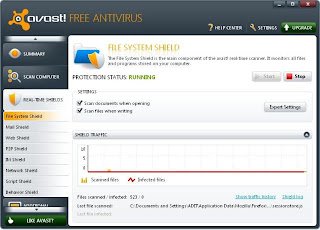
In addition to Real Time Shield features there are also other interesting features found on the avast antivirus free edition 6 of this, its name is: Additional Protection (extraprotection).
Additional Protection (Additional protection):
- Auto Sandbox: that is a technology that could play a variety of applications that aredeemed suspicious inside a virtual machine.
- WebRep: (Web Reputation) features provided avast allow each visitor to your blog /website to provide raputasi to the web / blogs that we visit, and it will be reflected from this WebRep.
- Site Blocking: that is a protection to parents who do not want their children to open a porn site or content that is violent, with this feature you can manually enter the website address you want in the block, so your child can be protected.
Download Avast Antivirus 6, Free Edition! here (56.25 MB).
Download Avast SN 6 here.
Subscribe to:
Posts (Atom)