Showing posts with label your. Show all posts
Showing posts with label your. Show all posts
Sunday, March 16, 2014
Double Space Your Text Quickly and Easily!
I love double spacing text when I give my kids short stories to read towards the end of the year! The extra space in between the lines makes it a lot easier for them to track the text from left to right!
This nifty keyboard shortcut will help make the task of double spacing your text in Microsoft Word a lot easier!

Read more...
This nifty keyboard shortcut will help make the task of double spacing your text in Microsoft Word a lot easier!

How to Easily Make Your Text Italic
I just love the look of italic text! I love that it makes things stand out without making them in your face like bold does. Its a nice simple way to accentuate something.
Well... if you use italic text in Microsoft Word, PowerPoint, Publisher, or if you use it on Blogger, this tip will save you a little bit of time!

Read more...
Well... if you use italic text in Microsoft Word, PowerPoint, Publisher, or if you use it on Blogger, this tip will save you a little bit of time!
Thursday, March 13, 2014
Do You Want Cheap Books For Your Classroom
There are so many things I love when it comes to my classroom... without card stock, Velcro, clothespins, magnetic tape and magnetic printer paper, I wouldnt know what to do! Ill definitely detail the infinite uses of all of those things one day, but all of those things being said, there is one thing that I am addicted to more than anything else: childrens books!!!
Take a look at how full my bookshelf is in my classroom!
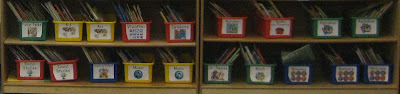
And thats not even all: I have 11 totes full of books in my basement! They are 64 qt. totes and hold 100-200 books!

Obviously, the cost of books can add up quick, especially when we have so many different topics that there are great read alouds for. But, there is a way to get books for your classroom for dirt cheap... library books sales!!! These are probably the best way to build a classroom library!
The best way Ive found library books sales is through this website:

Note: Im not getting paid to promote the website, Im posting it because it honestly is the best!!
Browse through the site to find sales near you. Usually the ones that state "Big Sale!" are pretty good, but only trial and error will really work. You can sign up for a weekly email alerts so youre always aware of the sales in your area (without having to remember to check the website!)
Now, any given day at a library sale is a steal for books... but do you want books for your classroom that are basically free? Of course you do!!!! So you need to go to the book sales on the best day... bag day! Most large library sales have this the last day of their sale. Fill up a whole bag full of books for $5! A lot of places let you even bring your own bag... I get a kick out of people with giant beach bags full of books (ok, so Im usually one of those people but it is funny to watch)!
Not only do I use bag day to stock up on new books for the classroom, but I also use it to fill my treasure chest! The kids just look to bring home books as a prize for their good behavior! I started off this year with two totes full of books for the treasure chest (easily 300 books that I paid a total of $10 for) and all of these books were gone by December! They were the most popular prize as well as the least expensive!
Read more...
Take a look at how full my bookshelf is in my classroom!
And thats not even all: I have 11 totes full of books in my basement! They are 64 qt. totes and hold 100-200 books!
Obviously, the cost of books can add up quick, especially when we have so many different topics that there are great read alouds for. But, there is a way to get books for your classroom for dirt cheap... library books sales!!! These are probably the best way to build a classroom library!
The best way Ive found library books sales is through this website:
Note: Im not getting paid to promote the website, Im posting it because it honestly is the best!!
Browse through the site to find sales near you. Usually the ones that state "Big Sale!" are pretty good, but only trial and error will really work. You can sign up for a weekly email alerts so youre always aware of the sales in your area (without having to remember to check the website!)
Now, any given day at a library sale is a steal for books... but do you want books for your classroom that are basically free? Of course you do!!!! So you need to go to the book sales on the best day... bag day! Most large library sales have this the last day of their sale. Fill up a whole bag full of books for $5! A lot of places let you even bring your own bag... I get a kick out of people with giant beach bags full of books (ok, so Im usually one of those people but it is funny to watch)!
Not only do I use bag day to stock up on new books for the classroom, but I also use it to fill my treasure chest! The kids just look to bring home books as a prize for their good behavior! I started off this year with two totes full of books for the treasure chest (easily 300 books that I paid a total of $10 for) and all of these books were gone by December! They were the most popular prize as well as the least expensive!
How to Add a Followers Box to Your Blog
A few months ago, Blogger changed the built-in followers box option to one that uses Google Plus - but a lot of people have asked me over time how to add the original followers box that you see on most blogs. Well... it took quite a bit of research but here it is!

Heres the poll!

I looked though and attempted so many different tutorials online for this... and I found the best one at Southern Speakers. I hadnt seen this website before but I suggest you check it out because it has a lot of great items!


As for next weeks tutorial, Im going to add another Blogger option... how to make a "grab my button" code for your sidebar (similar to the one below)!

Read more...
Heres the poll!
I looked though and attempted so many different tutorials online for this... and I found the best one at Southern Speakers. I hadnt seen this website before but I suggest you check it out because it has a lot of great items!
You can download this tutorial as a PDF by clicking this picture!
Note: This tutorial is hosted on Google Drive. To save it from there, just open the file and click File > Download to save onto your computer!
As for next weeks tutorial, Im going to add another Blogger option... how to make a "grab my button" code for your sidebar (similar to the one below)!
Tuesday, March 11, 2014
Fun Way to Get Your Kids to Stop Chatting!

This idea is actually a gem that one of my students thought of a few years ago! One of my classes favorite YouTube videos was this one... "If Youre a Boy" from Harry Kindergarten.
Well... my kids were chatty one day and I said "If youre a boy zip your lips." One of my girls said "If youre a boy, a boy, if youre a boy zip your lips!" And so a new tradition was born!
When my kids get chatty, all I do is start to sing the song!
If theyre extra loud, I have them do actions that will get the other students attention (e.g. ones that make them move more or make more noise) such as: pat your legs, jump up and down or clap your hands.
If theres only one or two students chatting, I usually do more silent action, such as zip your lips, fold your hands.
I actually also use this to get my students to clean up at the end of their writing period. I break it down step by step for them (since theyre kindergarten), so Ill say "If youre a boy, a boy, if youre a boy put your crayon away." Then I follow it by fold your hands, push in your chair, and walk to the carpet.
How do you get your kids to quiet down!
Sunday, March 9, 2014
Change the Capitalization of Your Text with Ease!
This tip is probably the one I use the most! Do you ever need to change your text to capitalize it? e.g.:from "happy thankgiving!" to "Happy Thanksgiving!" to "HAPPY THANKSGIVING!" Its actually surprisingly easy to do!

Read more...
This tip works the best in Microsoft Word. It will work to some extent in PowerPoint, but instead of doing "Title Case," it will capitalize the words as if they were in a sentence. Its definitely a nice trick if you want to change the way your text is capitalized!
By the way, Happy Thanksgiving!!! I hope everyone has a wonderful day!
Saturday, March 8, 2014
How to Easily Make Your Text Bold
This is probably one of my favorite keyboard shortcuts, mostly because it not only works in Word, PowerPoint, and Publisher... but it also works in Blogger!!!
I love that it makes it so easy to change my text to bold... it may only save a few seconds here and there... but all those seconds add up!!!

Read more...
I love that it makes it so easy to change my text to bold... it may only save a few seconds here and there... but all those seconds add up!!!
Monday, March 3, 2014
How to Load the Full Version of a Website on your iPad Smartphone!
I remember the days when my iPad automatically loaded the full version of a website... then I upgraded to IOS6 and all of a sudden the whole internet thought my iPad was a mobile device... yikes!!!
Unfortunately, theres no magic setting to switch the iPad back to the way it was before the update, but there are lots of ways you can load the full version of a website on your iPad!

Heres the poll for those of you keeping track! And, for those of you who havent been able to vote from your iPad/smartphone, do this tutorial now to load the poll so you can vote for next week! :)

There are three different options that you can use to load the full version of the site... and here they are!


Read more...
Unfortunately, theres no magic setting to switch the iPad back to the way it was before the update, but there are lots of ways you can load the full version of a website on your iPad!
Heres the poll for those of you keeping track! And, for those of you who havent been able to vote from your iPad/smartphone, do this tutorial now to load the poll so you can vote for next week! :)
There are three different options that you can use to load the full version of the site... and here they are!
You can download this tutorial as a PDF by clicking this picture!
Note: This tutorial is hosted on Google Docs. To save it from there, just open the file and click File > Download to save onto your computer!
For next weeks poll, Im going to add another iPad tutorial: how to take a screenshot on your iPad/iPhone... something that was necessary for me to write this weeks tutorial!
Sunday, March 2, 2014
Organizing Your Literacy Manipulatives!
Today was my first day setting up my classroom and I am wiped out! Im loving it so far, and Ill be sure to take lots of pictures to post when Im done!
In the meantime a lovely follower had a great idea... we all have our labels for our math manipulatives... but what about all of our literacy manipulatives? The magnetic letters, letter stamps, flash cards, etc.
I decided to create cute literacy manipulative labels that coordinate with my math labels... click the picture below to check them out!

Here are the math labels that coordinate with them:

Read more...
In the meantime a lovely follower had a great idea... we all have our labels for our math manipulatives... but what about all of our literacy manipulatives? The magnetic letters, letter stamps, flash cards, etc.
I decided to create cute literacy manipulative labels that coordinate with my math labels... click the picture below to check them out!
Here are the math labels that coordinate with them:
Saturday, March 1, 2014
Super Cute White Frames for Your TPT Products! Flash Giveaway!
I have to say I think I have more fun making frames and playing around with shapes than anything else! It definitely incorporates my love of math with my love of technology!
I finally decided to put together all of my white bracket/bubbly frames and make a set out of them! Check them out below! There are 38 different frames, each with and without a border for 76 total frames!!! Theyre normally $8 but the first person to guess which state Im going to be traveling to this summer will win them for free!
If youre not the winner, you can still grab the set while its on sale for tonight only for $6 instead of $8!

Happy guessing and be sure to leave your email address!
Update 9:15pm:
Congratulations to Liann at A Grade One Nut and Her Squirrelly Crew ! Im heading to Alaska this summer on a cruise with the hubby for our anniversary: 10 years since we started dating and two years since we got married!

Thanks to everyone else for all of your guesses! As for everyone who asked about making a tutorial: I have considered it but I made the frames in Adobe Illustrator which is a pretty expensive program. Ive been trying to keep my tutorials to free programs and programs that a lot of people have. I may write it up one day, but unfortunately it wont be in the near future. Sorry! :(
Read more...
I finally decided to put together all of my white bracket/bubbly frames and make a set out of them! Check them out below! There are 38 different frames, each with and without a border for 76 total frames!!! Theyre normally $8 but the first person to guess which state Im going to be traveling to this summer will win them for free!
If youre not the winner, you can still grab the set while its on sale for tonight only for $6 instead of $8!
Happy guessing and be sure to leave your email address!
Update 9:15pm:
Congratulations to Liann at A Grade One Nut and Her Squirrelly Crew ! Im heading to Alaska this summer on a cruise with the hubby for our anniversary: 10 years since we started dating and two years since we got married!
Thanks to everyone else for all of your guesses! As for everyone who asked about making a tutorial: I have considered it but I made the frames in Adobe Illustrator which is a pretty expensive program. Ive been trying to keep my tutorials to free programs and programs that a lot of people have. I may write it up one day, but unfortunately it wont be in the near future. Sorry! :(
Friday, February 28, 2014
How to Quickly Go to the Beginning of Your Document!
This trick is so simple but so handy! If youre working on a document in Word or PowerPoint and you want to jump back to the very first page in your document, this is going to help you do it so quickly!

Wednesday, February 26, 2014
Show Off Your Classroom!
I have to admit, I almost missed Mrs. Fultzs linky party because I really wanted to take some updated photos of my classroom, but seeing that this linky ends tonight, I want to be sure to show off some of my favorite things.. even if these pictures are from September!
 Yes, Im starting with this! I am so lucky to have a play Kitchen in my classroom! I also have a block area, but I dont have a picture of it! The kids absolutely love playing here, and it helps develop their socialization skills and their sorting skills (foods need to be put in the right baskets, same with the utensils and cups. Mostly, its a great place for the kids to just PLAY!
 This was probably one of my favorite things that I did (or that my mom did!) This summer, I read the book Spaces and Places by Debbie Diller and one of the amazing tips in the book is to use curtains to hide all of your things! I went to the Christmas Tree Shop and bought these purple Kitchen curtains and my mom helped me trim them to the right size.
In the book, Debbie Diller recommends hanging them with velcro, but since I started with actual curtains, I used a tension rod to hang them up so I wouldnt need glue or screws. The curtain on the right spans an 89" length so that one needed some hooks to help hold it up, but it helps hide all of my things and it looks so pretty! I also have matching cushions for the computer chairs, but again... these pictures were from September!
 Wow, my walls are empty! But again, heres my use of curtains to cover up my bookshelves! I hung them up with curtain rods. These are my cubbies also... I know the colors dont go so well in my classroom, but they work just fine! Another thing that I love in this picture is my daisy tables... perfect for Kindergarten!
 This picture has my library area and meeting area... the green bench doubles as a seat during reading time and a step to help us reach the smartboard, and the laundry basket has some nice pillows for cozy reading time!
Around the carpet, those green and yellow papers are my students blurred out names. I have the class sit along the outer edge of the carpet for the most part, though theyll move to their "smartboard seats" when were doing something on the board. I use those names through November/December to help students remember where they sit!
 My pride and joy... my shelves! I put these up myself!!! I even used an electric screw gun, a level, and toggle bolts for the metal studs. I am so glad I put these up!!! And yes... that is a mini-fridge! Im so glad I brought it in, it is the best!
To the left of this picture, the blurry art is a mixed media piece using oil pastels and watercolor paint to practice writing our name (hence the blur!)
 Clearly my bookshelf shows that this was from September! Anyway... more curtains, this time being used as they should be... to block the light.
This picture also shows my covered up windows :/ I have mixed feelings about this... unfortunately, it was the only place to put a word wall that was visible from everyones seats, and I was hoping that some light would come through the papers, but that didnt happen because of this:
 I had this wonderful idea to do an outdoor bulletin board... the blurry box has the name of our school on it.
I put up the following from the inside of my windows facing out. When I covered the windows in bulletin board paper (lots of effort and lots of tape!), the light was going through the windows and you could see the mirror image of "If you can dream it, you can do it..." shining onto our floor every time it was sunny out. I had to cover the bulletin board paper with black poster boards, then again with pretty bulletin board paper just to keep the sun out. It literally took a full day and a half just to do this project. And it ended up completely blocking all of the sunlight from the windows.
Now... the pros to this:
1. It was absolutely amazing looking from the outside!
2. I had no blinds on the windows so it helped block the light.
But the cons to this:
1. It fully blocks the light on four of my wonderful windows.
Im not sure if Ill be doing this one again next year because of that one major con, but well see!
Im linking up my classroom with Mrs. Fultzs Linky Party, stop by there to check out some other amazing classrooms!

Read more...
In the book, Debbie Diller recommends hanging them with velcro, but since I started with actual curtains, I used a tension rod to hang them up so I wouldnt need glue or screws. The curtain on the right spans an 89" length so that one needed some hooks to help hold it up, but it helps hide all of my things and it looks so pretty! I also have matching cushions for the computer chairs, but again... these pictures were from September!
Around the carpet, those green and yellow papers are my students blurred out names. I have the class sit along the outer edge of the carpet for the most part, though theyll move to their "smartboard seats" when were doing something on the board. I use those names through November/December to help students remember where they sit!
To the left of this picture, the blurry art is a mixed media piece using oil pastels and watercolor paint to practice writing our name (hence the blur!)
This picture also shows my covered up windows :/ I have mixed feelings about this... unfortunately, it was the only place to put a word wall that was visible from everyones seats, and I was hoping that some light would come through the papers, but that didnt happen because of this:
I put up the following from the inside of my windows facing out. When I covered the windows in bulletin board paper (lots of effort and lots of tape!), the light was going through the windows and you could see the mirror image of "If you can dream it, you can do it..." shining onto our floor every time it was sunny out. I had to cover the bulletin board paper with black poster boards, then again with pretty bulletin board paper just to keep the sun out. It literally took a full day and a half just to do this project. And it ended up completely blocking all of the sunlight from the windows.
Now... the pros to this:
1. It was absolutely amazing looking from the outside!
2. I had no blinds on the windows so it helped block the light.
But the cons to this:
1. It fully blocks the light on four of my wonderful windows.
Im not sure if Ill be doing this one again next year because of that one major con, but well see!
Im linking up my classroom with Mrs. Fultzs Linky Party, stop by there to check out some other amazing classrooms!
Tuesday, February 25, 2014
Keyboard Shortcut to Center Your Text!
Ive decided to start a new weekly tradition... a "Technology Tip Thursday" post! So many of you leave me such wonderful comments on my Technology Tuesday posts and I just love that!
I keep thinking that I have so many little tech tips that dont really warrant adding to the poll or writing a long tutorial on, so I thought it would be fun to post these little tips every Thursday in addition to my Technology Tuesday tutorial!
Most of the tips will be for Microsoft PowerPoint and Word... though some of them will work in other programs as well... just give it a try!
So... heres the first little trick!

Try it out and let me know how you like it!
Read more...
I keep thinking that I have so many little tech tips that dont really warrant adding to the poll or writing a long tutorial on, so I thought it would be fun to post these little tips every Thursday in addition to my Technology Tuesday tutorial!
Most of the tips will be for Microsoft PowerPoint and Word... though some of them will work in other programs as well... just give it a try!
So... heres the first little trick!
Try it out and let me know how you like it!
Monday, October 14, 2013
Find Your Cydia Account Number
You might find it meaningless about knowing how you can find your Cydia Account Number but you should realize that its really important for you to know it especially for give-aways.

The below video will show how easily you can find your Cydia Account Number by just going through three simple steps.
Finding Your Cydia Account Number in just 3 Simple and Easy Steps
Step 1: Open Cydia (Your device should be jailbroken).
Step 2 : Click the Manage Account on the main Cydia Tab and by using Google or Facebook, verify your account. You are likely to have one if you have made purchase of any app or tweak via Cydia.
Step 3 : Next below the Installable Purchase panel you will see your Cydia Account Number in small text once youve logged in. For reference in future, jot it down.
When you are in to participate in a jailbreak app or tweak giveaways, its helpful to know it. Thus its important to know it!
Sunday, October 13, 2013
Three Best Tools To Ease Your Windows
Three Best Tools To Ease Your Windows - Not much different with the development of other technology goods, computer jobs created for helping people who need them. But for some people, computers are goods that are difficult to use. Thats why they reasoned that they could not work fast in use.
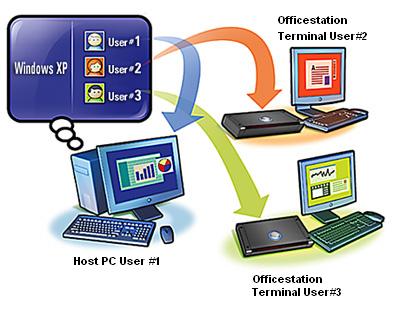
It was a spur humans to create a device that can quickly finish the job. Be it software or hardware. Here Any Tricks will review a little software application that will allow you to manage your PC.
FreeCommander
FreeCommander is an alternative to the default Windows file manager. This application will help you a daily struggle with Windows. With this FreeCommander application, youcan find the necessary functions to manage data stored on your hard disk. You can also take FreeCommander anywhere. Things you need to do is copy the installation directory to a CD or flash so it can use it on another PC. You can Download the official website located at www.freecommander.com

Xplorer2lite
Lets say you think, that you like from windows ekplorer complexity can be reduced. That picture explorer2lite. This application has two versions of the pro and lite. In comparison to its Pro version, lite version is much simpler. But important as are all of his remains. Xplorer2Lite offer two panels and tab folders, a feature to the efficiency of the Windows file management work. Features - features that are not owned flagship Windows Explorer, among others, synchronize folders, view side-by-side and internet search. Xplorer2lite advantage is that its interface can be adjusted as needed. Download in www.zabkat.com/x2lite.htm

Wireshark
This application is one of the Network Protocol Analyzer is the most widely used. This program lets you capture and interactively browse the computers on the network traffic. If youre an IT practitioner, Wireshark is one of the tools you need to have compulsory. Beyond that, it is possible this program can be use by a novice user, for example by parents who want to keep an eye on your home activities. You can go straight to the official website at www.wireshark.org / download.html to download it.

Hopefully with Three Best Tools To Ease Your Windows, can increase your desire to manage your PC. However, many applications are almost similar to the one mentioned above. But most often used is the author of three applications.
*Good luck*
How to make your Apple iDevices 4 micro SIM
Very Simple, just cut your standard SIM card with a scissors
or
Alternatively you can use a
Micro Sim Cutter for iPhone 4
- iPhone 4(16GB / 32GB)
see pictures below how it is work
or
Micro Sim Cutter for iPad 3G
- iPad 3G(16GB / 32GB / 64GB)This is how to make your own micro SIM card for IPad or iPhone 4 for FREE!
15mm × 12mm
iPad micro SIM cutter iPhone 4 micro SIM cutter TUTORIAL
1. This is how it looks like
2. This is how it looks like with your OLD SIM card
3. Place your OLD SIM card into the microSIM cutter like shown on the image
4. Your OLD SIM card in the microSIM cutter
5. Just push it down
6. There we have, YOUR VERY NEW micro SIM card in just 5 sec.
7. YOUR NEW micro SIM card for iPad or iPhone 4.
How to use your NEW micro SIM card in OLD standard SIM devices?
Just use a microSIM to SIM adapter like this one


Subscribe to:
Posts (Atom)