Showing posts with label sn0wbreeze. Show all posts
Showing posts with label sn0wbreeze. Show all posts
Friday, October 4, 2013
Sn0wbreeze Updated To v2 7 1 To Fix Vibration Issue

Just a quick heads-up: ih8sn0w updates his tool to v2.7.1 to include a fix for the iPhone3GS/i4 side switch vibration issue (only for 4.3.3!).
Download

Sunday, September 29, 2013
How to Unlock iPhone 4 3GS on iOS 4 3 with Ultrasn0w Sn0wbreeze 2 3b4
As iH8sn0w promised, he has just released Sn0wbreeze 2.3b4 which included ultrasn0w unlock fix for iPhone 4 and 3GS running the old basebands only on iOS 4.3. Lets check out the compatible & incompatible devices after the jump.

Which devices can be unlocked with Sn0wbreeze 2.3b4 ?
Incompatible basebands with Sn0wbreeze 2.3b4
For iPhone 3GS only (how to update to 6.15.00 baseband): before you will be able to unlock you device on iOS 4.3 you have to update your iPhone 3GS to 6.15.00 baseband then jailbreak it on iOS 4.1 or 4.2.1, you can follow our guide posted here (Redsn0w) or posted here (PwnageTool).
Note: if you have already 6.15.00 baseband on your iPhone 3GS then bypass the above step.
Step 1: Now you have to jailbreak your iPhone 4, 3GS running iOS 4.3 using Sn0wbreeze 2.3b4 (Download link at the End), you can follow the video guide posted in forum.

Step 2: After you have finished your jailbreak, you can now unlock you iPhone 4, 3GS with Ultrasn0w 1.2 from Cydia. Follow the steps below:


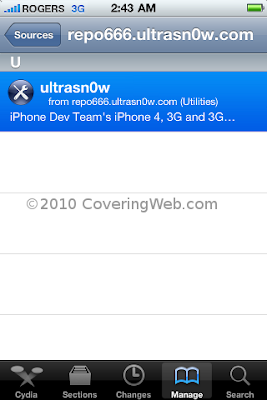
 Step 3: Now simply restart your iPhone, congratulations, now you have a fully unlocked iPhone 4 or 3GS, running iOS 4.3 !
Download Sn0wbreeze 2.3b4
Download iOS 4.3 for iPhone 4, 3GS
Read more...
Which devices can be unlocked with Sn0wbreeze 2.3b4 ?
- iPhone 4 running 1.59.00 baseband ONLY.
- iPhone 3GS running 04.26.08, 05.11.07, 05.12.01, 05.13.04 and 06.15.00 basebands.
Incompatible basebands with Sn0wbreeze 2.3b4
- iPhone 4 running 02.10.04, 03.10.01 and 04.10.01 basebands.
- iPhone 3GS running 05.14.02 and 05.15.04 basebands (you can upgrade to iPad baseband 6.15.00 but this may cause you to lose your GPS, otherwise you have to wait for dev-team unlock of Gevey SIM unlock)
For iPhone 3GS only (how to update to 6.15.00 baseband): before you will be able to unlock you device on iOS 4.3 you have to update your iPhone 3GS to 6.15.00 baseband then jailbreak it on iOS 4.1 or 4.2.1, you can follow our guide posted here (Redsn0w) or posted here (PwnageTool).
Note: if you have already 6.15.00 baseband on your iPhone 3GS then bypass the above step.
Step 1: Now you have to jailbreak your iPhone 4, 3GS running iOS 4.3 using Sn0wbreeze 2.3b4 (Download link at the End), you can follow the video guide posted in forum.
Step 2: After you have finished your jailbreak, you can now unlock you iPhone 4, 3GS with Ultrasn0w 1.2 from Cydia. Follow the steps below:
- Press to launch Cydia Installer from your SpringBoard.
- Press to select the Manage tab at the bottom of the screen.
- Press to select the Sources button

- Now touch on Edit and then on Add. You will be prompted to enter the URL of the source. Type http://repo666.ultrasn0w.com and touch on Add Source to add this repository.

- Once the source has been added press the large Return to Cydia button then select the Done button at the top right of the screen.
- Now select repo666.ultrasn0w.com from the sources list and at last select ultrasn0w from the list of packages as shown below then install this application.


Download Sn0wbreeze 2.3b4
Download iOS 4.3 for iPhone 4, 3GS
Saturday, September 28, 2013
How to use iBooty 2 0 to Boot into Tethered Boot Mode to Jailbreak iOS 4 3 on Sn0wbreeze 2 3b1
iH8sn0w has announced via twitter today the release of Sn0wbreeze 2.3b1 to jailbreak iOS 4.3 on iPhone 4 3GS, iPod touch 4G, 3G and iPad. Using baseband preservation mode Sn0wbreeze 2.3b1 preserves baseband. Using Sn0wbreeze 2.3 you can build custom IPSW firmwares for iOS 4.3.
NOTE: that you will need to have iBooty for tethered boot your iOS Device cause it is tethered jailbreak for iPhone 4, iPod touch 4G, 3G, iPad except iPhones 3GS (old baseband).


Note: iPad 2 is not supported by Sn0wbreeze 2.3.b1 As we know new ASLR technique is used in iOS 4.3 so Sn0wbreeze 2.3 breaks mobileSubstrate.
Sn0wbreeze 2.3b1 for Windows to jailbreak iOS 4.3 Download
iH8sn0w has released today Sn0wbreeze 2.3b1 comes with iBooty utility which tethered boot utility for iOS 4.3 tethered jailbreak. Every time you reboot your iOS 4.3 jailbreak idevice you have to use iBooty to boot into tethered boot mode made life easier for iOS 4.3 jailbreakers. until untethered jailbreak is released.you can follow the steps bellow to know how to use iBooty utility.
Notes: iBooty can tethered boot iPhone 4, iPhone 3GS , iPod Touch 3G, 4G & iPad 1.
How to Boot into Tethered boot mode using iBooty 2.0
1. Look for “iBooty-for-4.3” folder created by Sn0wbreeze 2.3b1. If you don’t find it, then recreate custom firmware for your idevice. During custom firmware creation Sn0wbreeze 2.3b1 will drop iBooty 2.0 with required files on your desktop.

2. Click on iBooty.exe present inside “iBooty-for-4.3” folder
3. Wait for disclaimer to disappear.
4. Now select your Device from drop down menu.
 5. Click on Start button and follow on screen instructions for DFU mode
6. Once Your device is in DFU mode iBooty will start uploading payload and exploiting with greenpois0n.

7. iBooty will display done message upload successful boot.
Now your iPhone, iPod Touch & iPad jailbroken on iOS 4.3 will boot into tethered boot mode ready for use.
Via blogsdna
When the iOS4.2.1 jailbreak was released, the concept of a tethered jailbreak to a lot of people was also released. We here at iJailbreak and I am sure a lot of our readers, have experienced tethered jailbreaks in the past, but I know to a lot of our readers the idea of a tethered jailbreak is a completely new concept. Not having the ability to reboot your iDevice is not a very nice limitation, considering a lot of Cydia tweaks require you to reboot your iDevice. Over the past month the tethered jailbreak has made a lot of people unhappy, and while unfortunately we can not do anything about this, we can point you to some tools to make your tethered jailbreak more bearable…
You see iBooty for example, is a tool being developed by the iH8Sn0w Dev-Team to make rebooting your tethered iDevice a lot easier. With iBooty on your computer, you simply click the iBooty.exe file and you will be presented with an easy to use GUI, where you can easily reboot your tethered iDevice into a jailbroken state. All you will need to do to get iBooty working, is to transfer a file to your iDevice through SHSH, AFC2 or iFile. Once you have done this, rebooting your iDevice into a jailbroken state will be a lot easier, than using alternative methods such as modified pwnage tool, tethered Boot tool and terminal/cmd.
Read more...
NOTE: that you will need to have iBooty for tethered boot your iOS Device cause it is tethered jailbreak for iPhone 4, iPod touch 4G, 3G, iPad except iPhones 3GS (old baseband).
Note: iPad 2 is not supported by Sn0wbreeze 2.3.b1 As we know new ASLR technique is used in iOS 4.3 so Sn0wbreeze 2.3 breaks mobileSubstrate.
Sn0wbreeze 2.3b1 for Windows to jailbreak iOS 4.3 Download
iH8sn0w has released today Sn0wbreeze 2.3b1 comes with iBooty utility which tethered boot utility for iOS 4.3 tethered jailbreak. Every time you reboot your iOS 4.3 jailbreak idevice you have to use iBooty to boot into tethered boot mode made life easier for iOS 4.3 jailbreakers. until untethered jailbreak is released.you can follow the steps bellow to know how to use iBooty utility.
Notes: iBooty can tethered boot iPhone 4, iPhone 3GS , iPod Touch 3G, 4G & iPad 1.
How to Boot into Tethered boot mode using iBooty 2.0
1. Look for “iBooty-for-4.3” folder created by Sn0wbreeze 2.3b1. If you don’t find it, then recreate custom firmware for your idevice. During custom firmware creation Sn0wbreeze 2.3b1 will drop iBooty 2.0 with required files on your desktop.
2. Click on iBooty.exe present inside “iBooty-for-4.3” folder
3. Wait for disclaimer to disappear.
 |
| image via blogsdna |
 |
| image via blogsdna |
 |
| image via blogsdna |
7. iBooty will display done message upload successful boot.
 |
| image via blogsdna |
Now your iPhone, iPod Touch & iPad jailbroken on iOS 4.3 will boot into tethered boot mode ready for use.
Via blogsdna
When the iOS4.2.1 jailbreak was released, the concept of a tethered jailbreak to a lot of people was also released. We here at iJailbreak and I am sure a lot of our readers, have experienced tethered jailbreaks in the past, but I know to a lot of our readers the idea of a tethered jailbreak is a completely new concept. Not having the ability to reboot your iDevice is not a very nice limitation, considering a lot of Cydia tweaks require you to reboot your iDevice. Over the past month the tethered jailbreak has made a lot of people unhappy, and while unfortunately we can not do anything about this, we can point you to some tools to make your tethered jailbreak more bearable…
Friday, September 27, 2013
Sn0wbreeze 2 5 1 Available Now !
iH8sn0w the well known hacker has just updated Sn0wbreeze to version 2.5.1, bringing full support for jailbreaking Apple TV 2G, Animate (animated boot logos) by the Chronic Dev Team, Cydia 1.1.1 and other bug fixes.

Whats new in Sn0wbreeze 2.5.1
Whats new in Sn0wbreeze 2.5.1
- Cydia 1.1.1 is now pre-installed.
- iPhone 3GS users can now flash the iPad 06.15.00 baseband.
- Animate (Animated Boot Logos) by the Chronic Dev-Team is now supported.
- Added afc2
- Apple TV 2 is now fully supported.
- Added Apple TV 2 DFU Instructions.
- YouTube issues resolved on hacktivated devices.
- iPhone 3GS old-bootrom issues fixed (Error 37).
Jailbreak iOS 4.3.1 untethered using Sn0wbreeze 2.5.1
To jailbreak iOS 4.3.1 untethered using Sn0wbreeze 2.5.1 just follow the guide of the last release that exactly similar to the new version. Just download Sn0wbreeze 2.5.1 from here, and then follow our detailed step by step guide posted in forum same as Snowbreez 2.5 to jailbreak iPhone 4, 3GS, iPod touch 4G / 3G, Apple TV 2G and iPad running the latest iOS 4.3.1 firmware.
Unlocking iOS 4.3.1:
Ultrasn0w 1.2 is broken on iOS 4.3.1. Wait for the Dev-Team to push new version of Ultrasn0w to unlock your iPhone (compatible basebands: 01.59.00 / 04.26.08 / 05.11.07 / 05.12.01 / 05.13.04 / 06.15.00). Temporarily, you can install Ultrasn0w fixer from djayb6.com repository in Cydia to get Ultrasn0w unlock working on iOS 4.3.1 (old baseband only).
Download Snowbreez 2.5.1
Sn0wbreeze 2 3b2 to Jailbreak iOS 4 3 Multitouch Gestures Security Hole Patching more
The well-known iPhone hacker iH8sn0w, has just released Sn0wbreeze 2.3 which jailbreak iOS 4.3 on iPhone, iPod touch and iPad. The new version allows you to enable Multitouch Gestures, patch the security hole (Mobile Substrate) and more.

Whats new on Sn0wbreeze 2.3b2:
Important note: Sn0wbreeze 2.3 is a tethered jailbreak on iOS 4.3. If you rely on ultrasn0w unlock, you should stay away from it as iOS 4.3 still cant be unlock even with Gevey SIM.
Download Sn0wbreeze 2.3b2 for Windows.
Read more...

Whats new on Sn0wbreeze 2.3b2:
- Adds Multitasking Gestures option in Settings App.
- iBooty bug fixes (Includes iBSS issues).
- iBooty is EVEN faster.
- MobileSubstrate is now working.
- Sleep bug in iPod Touches is fixed.
- Rare iPad 1G issues resolved.
- Added iREB to top bar for future re-runs within sn0wbreeze.
- ultrasn0w is STILL broken! Unlockers STAY AWAY!
Important note: Sn0wbreeze 2.3 is a tethered jailbreak on iOS 4.3. If you rely on ultrasn0w unlock, you should stay away from it as iOS 4.3 still cant be unlock even with Gevey SIM.
Download Sn0wbreeze 2.3b2 for Windows.
Sunday, September 15, 2013
Ih8sn0w Update sn0wbreeze v2 8b11

===============================
sn0wbreeze v2.8 [BETA 11]:
===============================
* Supports iOS 5.0 (9A334)/5.0.1 (9A405)
* Fixed iBooks sandbox crashing issues (as of 2.8b9).
* Fixed location services issues with iPhone 3GS
users running the iPad baseband (as of 2.8b9).
* Re-added iPad baseband install option to iPhone 3GS.
* Tethered devices are booted via iBooty which is
extracted to the Desktop after running sn0wbreeze.
===============================
Tethered?
===============================
- iPhone 3GS (old bootrom)...NO
- iPhone 3GS (new bootrom)..YES
- iPhone 4 (GSM)............YES
- iPhone 4 (CDMA)...........YES
- iPod Touch 3G.............YES
- iPod Touch 4..............YES
- iPad 1G...................YES
===============================
************************************************
** iPhone 3GS iPad baseband (06.15.00) users: **
************************************************
- Re-flash the iPad baseband via sn0wbreeze
if you restore(d) to a stock 5.0 firmware.
************************************************
Now available at: http://iH8sn0w.com
// iH8sn0w
Dowload
Wednesday, September 11, 2013
Sn0wbreeze 2 8 Beta 3 Released To Jailbreak iOS 5 Beta 2 On Windows
A new version of sn0wbreeze has just gone live a couple of hours ago. Sn0wbreeze 2.8 beta 3 now comes with added support for jailbreaking iOS 5 beta 2 on Windows. iOS 5 beta 2 was released yesterday by Apple for developers.

Official release notes of Sn0wbreeze 2.8b3:
========================If you are a Mac user, you can use our guide posted here to jailbreak iOS 5 beta 2 tethered on iPhone, iPad and iPod touch using a Mac machine.
sn0wbreeze v2.8 BETA 3:
========================
* Now jailbreaks iOS 5 (beta 2)
* Intended for developers ONLY!
* Does not Hacktivate or add afc2 in this release to prevent piracy.
* iPhone 3GS old bootrom users have an untethered boot.
* Now only 15MB :)
========================
Supported Devices:
========================
* iPhone 3GS (old bootrom) [UNTETHERED]
* iPhone 3GS (new bootrom) [TETHERED]
* iPhone 4 GSM [TETHERED]
* iPhone 4 CDMA [TETHERED]
* iPod Touch 3G [TETHERED]
* iPod Touch 4 [TETHERED]
* iPad 1G [TETHERED]
========================
Now available at: http://ih8sn0w.com/sb28b3
========================
Download Sn0wbreeze 2.8 Beta 3 for iOS 5 beta 2 jailbreak
Sn0wbreeze 2 5 Released to Jailbreak iOS 4 3 1 on iPhone iPod Touch iPad
iH8sn0w has just released sn0wbreeze 2.5 (aka PwnageTool for Windows) to bring untethered jailbreak for iOS 4.3.1 by creating custom firmware.
Supported devices:Download Sn0wbreeze 2.5 for Windows
- iPhone 3G/3G[S]/4
- iPod Touch 2G/3G/4
- iPad
- Apple TV 2

Subscribe to:
Posts (Atom)