Showing posts with label gevey. Show all posts
Showing posts with label gevey. Show all posts
Tuesday, October 8, 2013
Here is a List of Countries Gevey SIM Supports!
People have been asking a lot about the Gevey SIM and if it supports the country they are in. I contacted the support of Gevey SIM and did not get a reply. They are probably busy managing the huge orders. Anyways, I have compiled a list of countries that support the 112 emergency number. Remember, if your country supports the 112 number, only and only then you can unlock iPhone 4. If you country is not in the list don’t bother ordering it and wait for the software unlock for iPhone 4.

Warning: We at TechSliver still do not support Gevey SIM due to its current legal status in some countries. This is just an information we are sharing.
- Albania
- Andorra
- Austria
- Australia
- Belarus
- Belgium
- Bulgaria
- Colombia
- Croatia
- Cyprus
- Czech Republic
- Denmark (including Greenland, Faroe Islands )
- Ecuador
- Egypt
- Estonia
- Finland (including Åland)
- France
- Germany
- Gibraltar
- Greece
- Hong Kong (when called from mobile devices, routes to 999)
- Hungary
- Iceland
- India
- Indonesia
- Iran
- Ireland
- Italy
- Kazakhstan
- Israel
- Kuwait
- Latvia
- Lebanon
- Liechtenstein
- Lithuania
- Luxembourg
- Malta
- Malaysia
- Monaco
- Montenegro
- Netherlands
- New Zealand
- Norway
- Pakistan
- Paraguay
- Philippines
- Poland
- Portugal
- Republic of Macedonia
- Romania
- Russia
- Rwanda
- San Marino
- Serbia
- Slovakia
- Slovenia
- South Africa
- South Korea
- Spain
- Sweden
- Switzerland
- Syria
- Turkey
- Ukraine
- United Kingdom
- USA
- Vanuatu
- Vatican City
- Zimbabwe
You can read more about Gevey SIM and how it all started to know it better. Here is a complete guide on how to unlock iPhone 4 using Gevey SIM.
Warning: This is not a final list, or not an official list. Its not necessary that Gevey SIM would work in your country, this is a list of countries that support 112. Also, most of these countries redirect 112 to a local emergency number. So check with Gevey SIM official site before buying or rushing into any purchase.

For those of you who might know, Gevey SIM has the ability to unlock an iPhone 4 on baseband 2.10.04 or 3.10.01 running iOS 4. This was confirmed when users themselves tried it and so there are no rumors about it whatsoever.
Gevey SIM supports:
iOS:
- 4.2.1
- 4.1
- 4.0.1
- 4.0
- 3.10.01
- 2.10.04
- 1.59.00
Warning: The process is not recommended by TechSliver due to its current legal status so proceed at your own risk.
How to Unlock iPhone 4, Baseband 2.10.04 / 3.10.01 Procedure!
[ Step 1 ] Turn off your iPhone 4 and insert both Gevey SIM and your own SIM card using metal SIM tray.
[ Step 2 ] Turn your iPhone 4 back on and you will see a SIM Welcome menu, simply select “accept”.
[ Step 3 ] At the beginning you will be able to see a “no service” message on your iPhone. Now you have to wait for some time to see the signal bar.
[ Step 4 ] Once the signal bar appears on the top left corner, dial “112″ and hang-up within 2 seconds.
[ Step 5 ] Turn your Airplane Mode on and then turn off right away. You will now see a “SIM Failure” message on your iPhone and then you will see “No SIM Card Installed”.
[ Step 6 ] Turn your Airplane mode on once again and turn it off right away again until you see the “No SIM Card Installed” message showing up. You will now see a ‘SIM Failure’ message and after few seconds the signal will show up.
[ Step 7 ] The process is complete and now you have your iPhone 4 unlocked on baseband 02.10.04, 03.10.01 using Gevey SIM.
However, the process is a bit temporary since if no signals appear, you have switch off your iPhone and follow the steps all over again. The process is for the people who are really tired of waiting for software unlock of iPhone 4 and cannot wait any more.

Sunday, October 6, 2013
UNLOCK iOS 5 with GEVEY SIM
Yesterday at WWDC 2011, Apple announced (amongst many other things) iOS 5, the upcoming version of iOS that’s to be released with the iPhone 5 later this year. iOS Developers and certain tech bloggers have been given access to this build, and we’re sure one of the biggest question the hordes of iPhone users around the world are asking is: Will my Gevey-3G unlock SIM interposer work???
With iOS 5 beta (build 9A5220p), the modem firmware has been upgraded to 04.11.04 and cannot be downgraded to earlier versions, meaning the only possible SIM unlock would be a turbo sim/interposer, hence the worried and nervous questions going around the online iPhone community.
And the answer? A relieving yes. At least for now, for iOS 5 beta 1, it does. The process remains unchanged — just insert the interposer, restart your device, accept the welcome message, dial 112, and toggle the Airplane Mode feature a few times. The Gevey SIM will still work to unlock iOS 5.0 beta.
However, in order to install iOS 5 you’ll need (in addition to access to the iOS 5 9A5220p IPSW firmware upgrade and the iTunes 10.5b27 build) access to a real SIM from whatever manufacturer your phone originally shipped with (probably AT&T) for the activation to go through. And you’ll of course need to have your phone registered as a developer device on the iOS Developer Center website.
Enjoy your interposer-unlocked iOS 5 and let us know how it goes!

Gevey SIM Will Unlock iPhone 4 on iOS 5

Following the news that RedSn0w will jailbreak iOS 5, an unlock solution for the iPhone 4 on iOS 5 has also been uncovered. The Gevey SIM is a TurboSIM-like piggy back SIM card that will unlock iPhone 4 basebands.
On iOS 5, it appears that the Gevey SIM will still unlock the
iPhone 4. Be warned: the Gevey SIM is technically illegal, so we do not recommend this method for unlocking the iPhone 4 on iOS 5.
A Redmond Pie reader sent in some screenshots of his iPhone 4 unlocked with the Gevey SIM,

We have no confirmation of Gevey SIM baseband incompatibility on the iPhone 4 with iOS 5. If you’d like to learn a little more about the Gevey SIM, check this out.
Who’s excited about unlocking the iPhone on iOS 5?
Saturday, September 21, 2013
How To Identify Fake GEVEY Sims Avoid Getting Scammed
How To Identify Fake GEVEY Sims & Avoid Getting Scammed
Ever since I unlocked my iPhone 4 using GEVEY Sim, I was facing battery drainage problems and also the area around the sim slot was getting over-heated. I thought my battery drain was due to iOS problems or over-usage.==================================
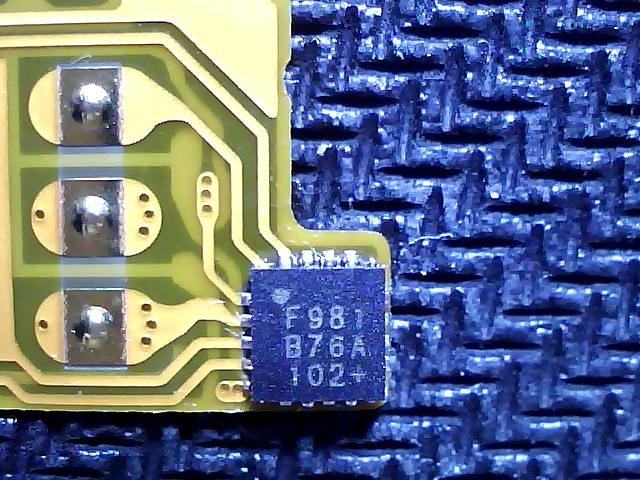
Today I was going through Yahoo! Answers and found this question. I found the answer posted xbowlover interesting. Here’s what he says about the difference in original and fake GEVEY Sims:You may also want to read: Difference Between Real & Fake GEVEY Pro SIMs This immediately struck me and I got a pin and removed the GEVEY Sim tray from my iPhone and found that there isn’t any number on the black part of the IC chip. Also, I thought to do some Google research on F981 chips used in GEVEY. And I found a Chinese site telling about the F981 & F300 chips.
The main difference is they use different chips. The original one uses F981 chips. You can see the digital numbers on the gevey SIM (The black part). And the copy one uses F300 chips. The manufacturers usually wipe the numbers out, and you will not see any digital numbers on the black part.
Only original Gevey SIM comes with F981 as they have bought out this chip in the market, so others can only use F300. And the original Gevey SIM drains less battery and has better signal reception.
Here’s what it reads after using Google Translate (I’ve improved the Grammar):
There are many counterfeit GEVEY sims in the market, all are very similar in appearance, but they have a lot of problems. They likely cause unnecessary damage to the iPhone. Your eyes cannot easily distinguish between the original and counterfeits.
After the Genuine GEVEY Sim is exposed to bright light, you can see the black chip has F981 written on it.
Following is a picture of genuine GEVEY:
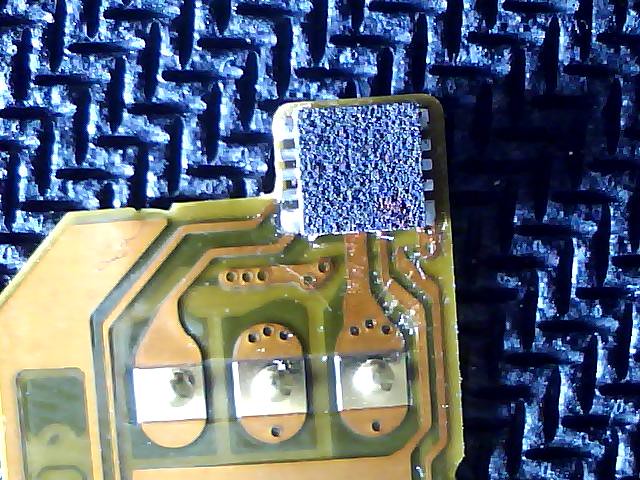
Counterfeit GEVEY sim uses F300 chips. Fake sims use the process of hand-welding which is quite rough. F300-chip voltage ranges from 3.0 ~ 3.6V, so the SIM card operates at 3.0V. The original GEVEY sims operates at 1.8V. Also, the thickness of F300-chip is twice the thickness of the F981-chip. This can lead to GEVEY tray being stuck in the iPhone. It cannot easily get in or get out.
- The surface of the F300 chips doesn’t have anything written on it. Here is the picture of fake GEVEY chip or F300 chip:
(Unfortunately, the GEVEY chip I’m using also doesn’t have anything written on it)
Use of counterfeit sims is related to risks and consequences. The appearance and size is the almost same, but the difference is in the power consumption of the sim. This greatly reduces the standby time of the iPhone.
Here are the problems caused by counterfeits:ApplenBerry.com had posted a tutorial on this page, but it seems to be gone now. Please tell us if you are facing the same problems, like battery drainage and over-heating of the sim in the comments below. Also tell us if F981 is printed on your GEVEY chip.
- Increased power consumption, mobile phone standby times are noticeably shorter.
- SIM card can cause problems ranging from permanent damage to the possibility of burning.
- The Baseband chip can be seriously damaged.
And new buyers, don’t get scammed. Buy only after checking if F981 is printed on the GEVEY chip.
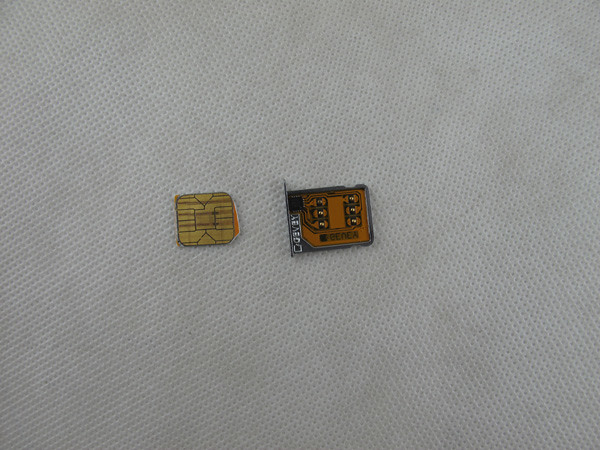
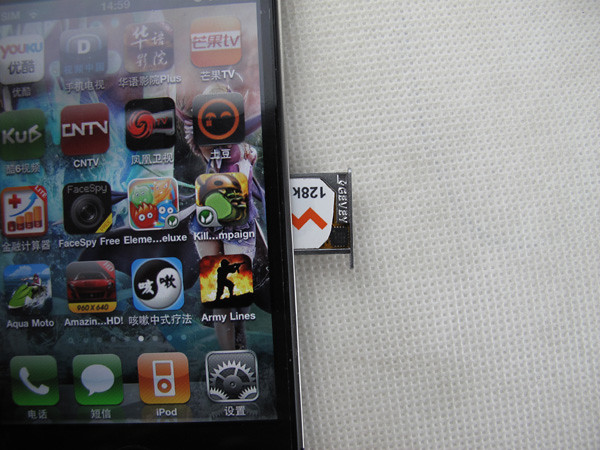
Update 1: Here are two more pictures to support this topic:
Click the images for a larger view. You can see F981 printed on the IC.
I got it from Dill Huang’s Singularity blog. He was the first person to post how the GEVEY sim works, so he must’ve got the original GEVEY sim then, because at that time GEVEY was not launched to the public and chances of getting clones were zero.
And certain persons have reported that the GEVEY Pro sim (ordered directly from Applenberry.com) doesn’t have anything written on the IC chip. So, it may have happened that the company producing GEVEY must have stopped printing F981 and other things on the IC chip. But, this will be the case only for the recent GEVEY sims. The older GEVEY sims which were brought in the initial period of the launch must have F981 printed on them.
Update 2: I got a Youtube video and Scribd.com slides which show the difference between original GEVEY sim and fake GEVEY sim
Link to Youtube video – This video shows a complete comparison of original and fake GEVEY sims (including the puter cover, the plastic covers, the manual, IC chip, etc)..
Link to Scribd slides – This shows the pictures of original & fake GEVEY simsSome features of the Original GEVEY sim that I learnt from the Youtube video:The video also says that the GEVEY sim used in ApplenBerry’s first demo video had some extra design. The design changed in the later productions of GEVEY.
- The original GEVEY sim shows an “English Menu” whereas the fake ones show “Chinese menu”
- The sim tray of original GEVEY is of superior material and has “GEVEY” engraved on it, while the fake one’s sim tray if of lower quality and it has “GEVEY” printed on it, not engraved
- The circuit design of both is same, just the original one has F981 printed on it
I must tell people here that both GEVEY Sims work. You can call, send/receive texts, etc. But it’s the matter of quality, the GEVEY Sim from ApplenBerry gives you 100% quality, whereas the GEVEY sims from Chinese suppliers are clones. They are not 100% same as the original ones, but let you use your iPhone 4 to make calls, SMS, etc..
Original Gevey sim site
- GEVEY Ultra
Provides two different ways to unlock your iPhone 4.
Manual Process
•Recommended for basic users
•Setup time will take less than 3 minutes
•Applenberry staff provides full technical support
Automatic Process
•Recommended for EXPERT USERS ONLY
•NO NEED to DIAL 112
•iPhone 4 require jailbreak**NOTE: applenberry staff will not provide technical support for jailbreak of your iPhone 4.
Package content:
•1x Custom GEVEY Sim Tray
•1x GEVEY Ultra Sim
• 2x MicroSim Sticker Guide
The long wait is over. You can now unlock your iPhone 4. GEVEY Ultra SIM will work for iOS version 4.1, 4.2, 4.2.1, 4.3, 4.3.1, 4.3.2, 4.3.3 with baseband 1.59, 2.10, 3.10.1, 4.10.1
http://applenberry.com/store/gevey-sim/gevey-ultra.html

Friday, September 6, 2013
Unlock 4 3 5 iPhone 4 with Original Gevey Sim Ultra
Unlock 4.3.5 iPhone 4 with Gevey SIM Ultra is possible. As we reported you that Apple has released iOS 4.3.5 for iDevices yesterday to fix some security issues found in latest firmwares. For who dont know that Gevey Sim ultra can unlock 4.3.5 iPhone 4 without calling 112.
One of our readers has successfully unlock 4.3.5 iPhone 4 with Gevey SIM Ultra. For ultrasn0w unlockers, iPhone dev-team has not updated ultrasn0w to unlock 4.3.5 iPhone 4, so we advice who rely on ultrasn0w unlock to stay away from iOS 4.3.5 update.
If you want to buy Gevey SIM, we recommend to buy it from GEVEY Ultra unlock iPhone 4 iOS 4.0, 4.1, 4.2.1, 4.3.1, 4.3, 4.3.2, 4.3.3 baseband 1.59, 2.10, 3.10.1, 4.10.1
GEVEY Ultra
Provides two different ways to unlock your iPhone 4.
Manual Process
•Recommended for basic users
•Works on iOS 4.1, 4.2, 4.2.1, 4.3, 4.3.1, 4.3.2, 4.3.3, 4.3.4, and 4.3.5
•Setup time will take less than 3 minutes
•Applenberry staff provides full technical support

Subscribe to:
Posts (Atom)